
PvP
Module: PvP
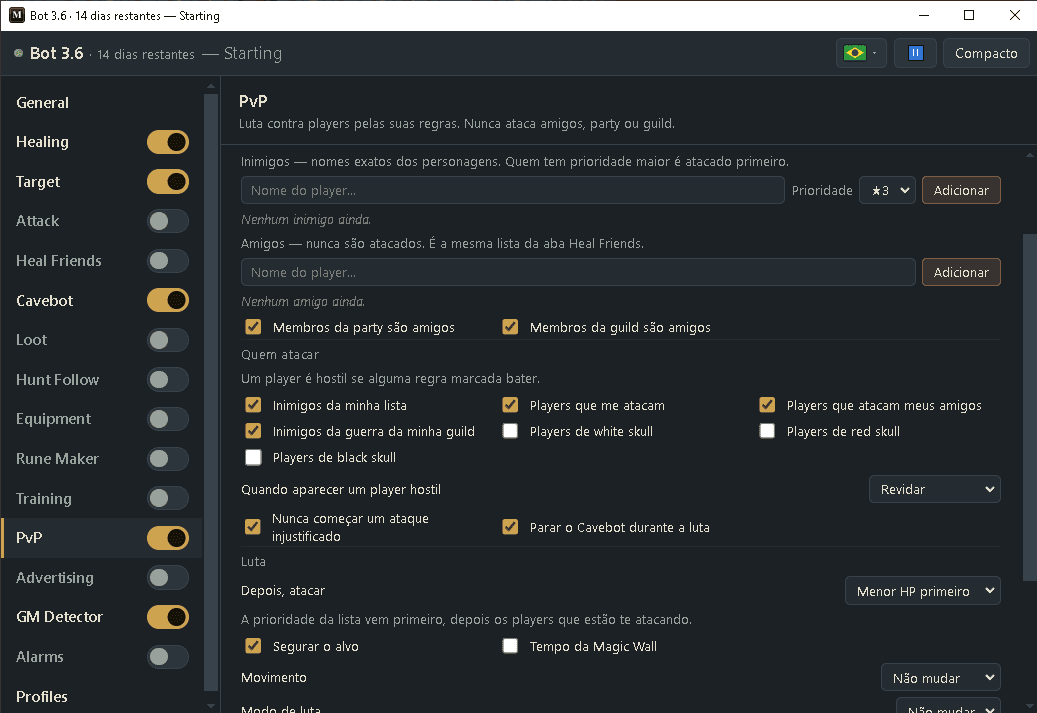
Fights other players for you. You list your enemies and your friends, choose who counts as hostile (your enemies, players attacking you or your friends, enemies of your guild war, skulls), and the bot targets the right one, keeps the target, shoots your rune (like SD) and can follow a combo leader — it hits whoever the leader hits, even if the leader doesn't use the bot. Friends, party and guild are never attacked, and by default it never starts an unjustified attack (no skull for you).
How to turn it on
- 1Click Bot, then ⤢ (All settings) and pick PvP in the list.
- 2Add your enemies (with a priority) and your friends.
- 3In “Who to attack”, tick who counts as hostile.
- 4Put your attack rune (for example Sudden Death) on a hotbar key set to Target. A green badge means it is ready.
- 5For a combo, tick “Follow the leader's target” and add your leader's name.
- 6Turn PvP on with its switch in the list (All settings).
Settings, one by one
Players
Enemies + priority
Players you want to fight, by exact name. A higher priority (★1 to ★5) is attacked first when several are on screen.
Values: Up to 50 names. Default priority ★3.
ExampleBad Guy ★5, Rival ★3
Friends
Players the bot never attacks. It is the same list as in the Heal Friends module, so friends you add here are also healed (if Heal Friends is on).
Values: Up to 15 names.
ExampleKnight Bob, Paladin Ann
Party / Guild members are friends
Treats everyone in your party, and everyone in your guild, as a friend too.
Values: Both on by default.
Exampleon, on
Who to attack
Hostile players
A player is hostile if any ticked rule matches: on your enemy list, attacking you, attacking one of your friends, an enemy of your guild war, or with a white, red or black skull.
Values: Enemies, attackers, friend attackers and war enemies on by default; skulls off.
ExampleEnemies + attacking me + attacking my friends
When a hostile player shows up
“Fight back” attacks them. “Only show them here” just lists them on this page without attacking.
Values: Fight back (default) or Only show them here.
ExampleFight back
Never start an unjustified attack / Stop the Cavebot while fighting
The first only attacks players who are already marked (a skull, attacking you or a friend, or a war enemy), so you don't get a skull. The second makes the Cavebot wait while you fight.
Values: Both on by default. Turning the first off lets the bot attack unmarked enemies from your list — that gives you a skull.
Exampleon, on
Fight
Then attack / Hold the target
List priority comes first, then players attacking you, then this choice: lowest HP or nearest. “Hold the target” keeps your target when it leaves the screen and attacks it again when it comes back (up to 10 seconds). Press Esc to let go.
Values: Lowest HP first (default) or Nearest first. Hold on by default.
ExampleLowest HP first, hold on
Magic Wall timer
Shows on every Magic Wall (20 seconds) and Wild Growth (45 seconds) on your screen how many seconds are left before it disappears, like ElfBot and MageBot used to. The count starts when the wall appears. A wall that was already there when you arrived shows “≤” in front of the number: the game does not tell how old it is, so that is the most it can still last. Only your screen shows it, and it works even with the PvP switch off.
Values: Checkbox in the Fight section. Off by default.
Exampleon — a fresh Magic Wall in front of you shows 20, 19, 18…
Movement / Fight mode / PK lock
What the bot sets while fighting: chase or stand, your fight mode, and the PK lock. With the PK lock on you can't attack players, so the bot turns it off to fight and back on afterwards. Your fight mode also goes back to what it was.
Values: Movement and fight mode: Don't change (default) or a choice. PK lock: Turn off while fighting (default) or Don't change.
ExampleFollow, Offensive, Turn off while fighting
Runes and spells
Rune on the target
Shoots the chosen rune at the player you are fighting, when their HP is at or below the first number and yours is at or above the second.
Values: Sudden Death (default), Heavy Magic Missile or Light Magic Missile. Target HP 1–100 (default 100 = always). My HP 0–99 (default 30).
ExampleSudden Death, ≤ 100%, ≥ 30%
Paralyze rune every … s
Druids: throws a paralyze rune at the target every few seconds when it is not next to you, so it can't run away.
Values: Off by default. 2 to 30 seconds (default 6). Needs the paralyze rune on a key set to Target.
Exampleon, 6 s
Also cast the Attack tab spells on players
Single-target spells and runes from your Attack module (strikes, SD…) also hit the player you fight. Area spells never.
Values: Off by default.
Exampleon
Combo
Follow the leader's target + leaders
Attacks whoever your leader attacks and shoots the rune at the same moment. The bot sees who the leader hits, so the leader doesn't need the bot. If you add more than one leader, the first one on screen leads.
Values: Off by default. Up to 3 leaders, in order (▲▼ to change). A leader is always treated as a friend.
Example1. Boss, 2. Second
Also follow on monsters / Follow even on unmarked players
The first also follows the leader on monsters (team hunts). The second follows the leader even on a player without a skull — that gives you a skull.
Values: Monsters off, unmarked on by default.
Exampleoff, on
On screen now
Players on screen
Every player you can see, with level, vocation, skull, if they are a friend or enemy, their HP and if they are hitting you. Use + Enemy or + Friend to add them to a list in one click.
Values: Hostile players are red, friends green.
ExampleBad Guy · Lv 87 · red · Enemy · hits me
Ready example — war team with a leader
- Enemies: Bad Guy ★5, Rival ★3. Friends: your team. Party and guild members are friends: on.
- Who to attack: enemies, players attacking me, players attacking my friends, war enemies.
- Rune on the target: Sudden Death on F7 (Target mode), ≥ 30% of my HP.
- Combo: on, leader “Boss”. When Boss hits someone, every bot on the team targets them and shoots SD together.
- Turn PvP on with its switch.
Attacking a player without a skull gives you a skull. Keep “Never start an unjustified attack” on unless you really want that.
Turn on “Attack Indicator” in the game settings: the bot then knows who is attacking you right away.
If you pick a player yourself, the bot helps with your target instead of changing it. Press Esc to stop; the bot leaves that player alone for 15 seconds.
The rune needs its hotbar key set to Target in the game. Orange text next to the rune tells you what to fix.