
GM Detector
Module: GM Detector · on at every start
Reacts like a real player when a Gamemaster or a Chancellor shows up, or a monster says your name (an anti-bot check). The bot stops hunting, walks back to its spot if it was moved, answers in chat twice like a person and stands still while the GM watches. When the GM leaves, it goes back to hunting by itself. It also solves the game’s anti-bot captcha by itself (the “Solve the anti-bot captcha by itself” checkbox in “React to”, on by default) — even with the GM Detector switch off; only that checkbox turns it off. It comes on every time the bot starts. You can turn it off with its switch, but it is back on the next time the bot starts (when you open the app again or the game page reloads). While it is on, it keeps watching even when you press Pause all.
How to turn it on
- 1Click Bot, then ⤢ (All settings) and pick GM Detector in the list.
- 2Write your own messages in “First reply” and “Second reply” (strongly recommended).
- 3Check the rest — the defaults already work well. “Solve the anti-bot captcha by itself” (in “React to”) is already on; turn it off only if you want to answer every captcha yourself.
- 4Nothing to turn on: it is already on every time the bot starts. Its switch is in the module list if you want to turn it off for now.
Settings, one by one
What happens when a GM shows up
It reacts to a GM you can see on screen (a Gamemaster or God), to a Chancellor (the player moderator with a green cape), or to a monster that says your full character name. Then, in this order:
It warns you
Flashes the window and plays a siren (you can turn the sound off in Sounds).
It pauses hunting
Cavebot, Target, Training, Attack, Rune Maker and Fishing stop. Healing, Heal Friends and Ammunition keep working, so you stay safe.
It stops and walks back
Your character stops. If the GM moved you a few sqm, the bot walks back to the spot where you were — but only when you are not fighting.
It answers twice
The first reply comes about 1 second later (2.5 s for a monster), the second one 2.5 seconds after that (3 s for a monster). Each one is picked at random from your lists, never the same one twice in a row.
It waits, then goes back to hunting
It stays paused while the GM is on screen and goes back to hunting about 3 seconds after he leaves. It won’t react to the same GM again for 10 minutes.
Status and staff nearby
Status · Resume now
Shows what the GM Detector is doing right now (“Watching” while no GM is around). While it is reacting, a “Resume now” button shows up: press it to end the pause at once (that GM stays on cooldown).
ExampleGM on screen · paused · 12 s
Staff nearby
Lists the staff around you: name, “invisible” for a GM in ghost mode, how far (sqm) and in which direction, and how long until the bot reacts to that GM again.
ExampleGM Bob · 4 sqm NE · won't react again for 10 min
React to
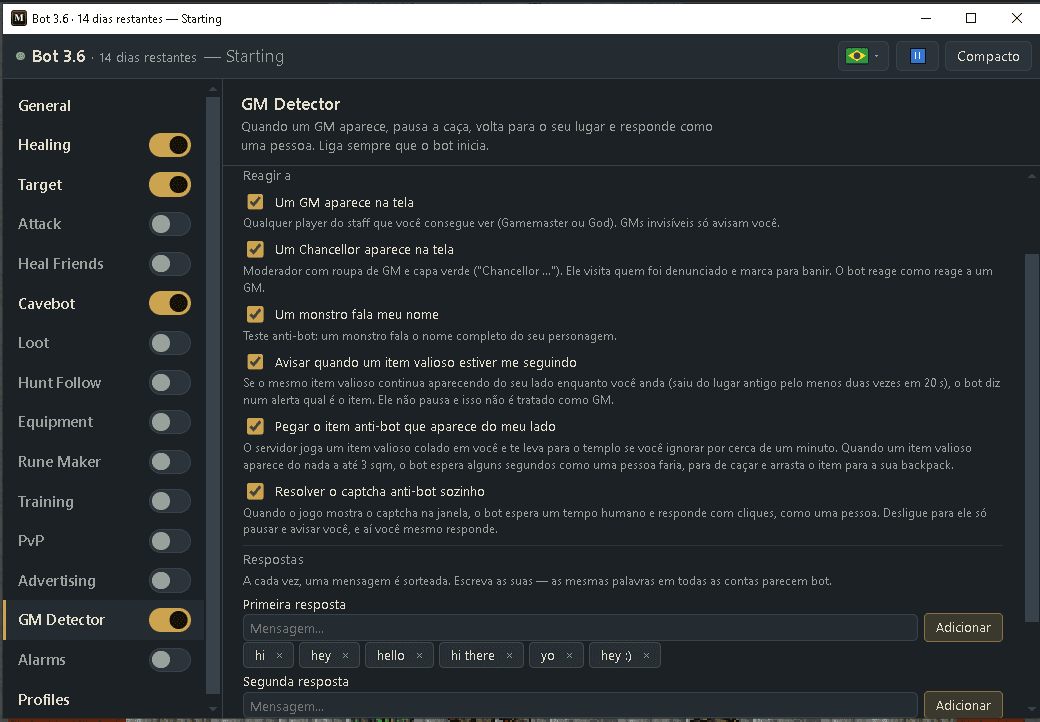
A GM appears on screen · A Chancellor appears on screen · A monster says my name
Choose what starts a reaction. “A GM appears on screen” is any staff player you can see (Gamemaster or God). “A Chancellor appears on screen” is the new player moderator who looks like a GM with a green cape (their name starts with “Chancellor”): they visit players who were reported and mark them for a ban, so the bot reacts to them just like to a GM. “A monster says my name” is the anti-bot check where a monster speaks your full character name.
Values: All three on by default.
Warn about a valuable item following you
If the same valuable item keeps showing up next to you while you walk (it left its old spot at least twice in 20 seconds), you get an alert with the item’s name, like “Valuable item following you: demon shield”. The bot does not pause and does not treat it as a GM. Items lying still (loot, depot, shop shelves) never count, and neither does being teleported by an NPC (Oracle, boat).
Values: On by default. One alert per item every 10 minutes.
Pick up the anti-bot item that appears next to you
The server sometimes drops a valuable item (a shield, legs, a sword…) right next to your character, and moves you to the temple if nobody picks it up within about a minute. When a valuable item shows up out of nowhere within 3 squares, the bot waits a few seconds like a person would, stops hunting for a moment and drags the item into your backpack (on the phone it double-taps it). Items that were already lying there when they came into view (loot, shops) are never touched, and nothing happens in protection zones. If it can’t pick the item up after 3 tries, you get an alarm.
Values: On by default. Keep a backpack on and some free capacity.
Answer the math question a GM asks (like 434+2?)
GMs sometimes test you with a sum, like “434+2?”. With this on, the bot reads what a visible GM says on screen, works out simple whole-number sums, subtractions, multiplications and divisions, and answers the result in chat after a natural pause (a few seconds, longer for bigger numbers) — in place of the ready-made reply that would come next, so it never answers “exura” to a question. Questions sent by private message are not read.
Values: On by default.
ExampleGM says “434+2?” — about 3 seconds later your character says “436”
Solve the anti-bot captcha by itself
When the game shows its anti-bot captcha inside the game window, the bot waits a human moment and answers it with clicks, like a person. If it is not sure of the answer, it does not click — then answer it yourself. Turn it off and the bot only pauses and warns you, and you answer every captcha yourself. (This used to be the Captcha module.)
Values: On by default.
Replies
First reply · Second reply
Your two lists of chat messages. Each time, one message is picked at random from each list, never the same one twice in a row. Type a message in the box and click Add; click × to remove one.
Values: Up to 8 messages per list, each up to 120 characters. Comes with: “hi”, “hey”, “hello”, “hi there”, “yo”, “hey :)” / “exura”, “all good?”, “sup”, “what's up?”, “:)”, “hmm?”.
ExampleFirst: “hey”, “yo” · Second: “all good?”, “just hunting”
Timing
GM / Monster: 1st after · 2nd after · Resume after
How long to wait before each reply, in seconds. “1st after” counts from the moment the bot notices; “2nd after” counts from the first reply. “Resume after” is how long after the GM leaves the bot goes back to hunting. Every reply to a GM now waits at least 1 second, so the answer never comes out instantly.
Values: 1 to 10 s. Defaults: GM 1 s and 2.5 s, Monster 2.5 s and 3 s, Resume after 3 s.
ExampleGM: 1st after 1.5 s, 2nd after 3 s
Human-like timing
Changes every wait by up to 25%, so the answers never come at the exact same moment.
Values: On by default.
Behavior
Walk back to my spot if I was moved, up to … sqm
If the GM pulls or pushes you a little, the bot walks back to where you were before it answers. It only does this when you are not fighting.
Values: 1 to 10 sqm. Default: on, 7 sqm.
Exampleup to 5 sqm
If moved farther or to another floor
If you are pulled farther than that, or to another floor, the bot plays an alarm. “Stay paused until I resume” keeps it still until you press “Resume now”. “Resume normally” lets it go back to hunting as usual.
Values: Default: Stay paused until I resume.
Pause
What stops during the reaction. “Hunting” stops Cavebot, Target, Training, Attack, Rune Maker and Fishing. “Cavebot only” stops just the walking. Healing keeps working either way.
Values: Default: Hunting.
Stay paused while a GM is on screen
Keeps the bot still the whole time the GM is visible. It goes back to hunting a few seconds (Resume after) after the GM leaves.
Values: On by default.
Ignore GMs in a protection zone
Does nothing while you are in a protection zone (a temple, a depot…).
Values: On by default.
Don't react to the same GM again for … min
After reacting to a GM, the bot leaves that same GM alone for this long, so it doesn’t greet him every time he comes back.
Values: 1 to 60 minutes. Default: 10.
Example15 min
Mark invisible GMs on the game screen
Draws a purple “GOD” box on a GM in ghost mode, so you can see where he is. Only you see it.
Values: On by default.
Sounds and extra names
Sound when a GM appears · Sound when a monster says my name
Says “GM detected” (or “Chancellor detected”) out loud when one appears, and “A monster said your name” when a monster says it. If your computer or phone has no voice, it plays a siren and a double beep instead.
Values: GM: on. Monster: off.
Extra staff names
The bot already spots staff by itself. Add a name here only if a staff member is missed. Type the exact name.
Values: Up to 20 names.
Ready example — what you will see
- A GM appears 4 sqm away → you hear the siren and the bot stops.
- About 1 s later it says “hey”; 2.5 s after that, “all good?”.
- It stands still while he watches (Healing keeps working).
- He leaves → 3 s later the cavebot walks again.
- If he comes back in the next 10 minutes, the bot does not greet him again.
Write your own replies. The default messages are the same on every account that uses the bot — identical words on many characters look like a bot.
Invisible GMs (ghost mode): nobody can see them, so the bot never reacts in game — no pause, no walking, no chat. It only warns you: they show up as “invisible” on the GM Detector page, with a purple “GOD” box on the game screen, and, with the Alarms switch on, the “Invisible GM nearby” alarm plays a sound.
On Android, if the full window is open when the bot needs to type, it closes it first (on PC the bot window never gets in the way of typing). It never types while a captcha is open.
While the GM Detector is reacting, the Alarms module won’t log out or auto-reply, so only one of them talks.