
Rune Maker
Module: Rune Maker
Makes runes while you stand still. It presses your rune-spell hotkey whenever you have enough mana (at most one every 2 seconds). Keep blank runes in your backpack and turn on the game’s Auto Eat.
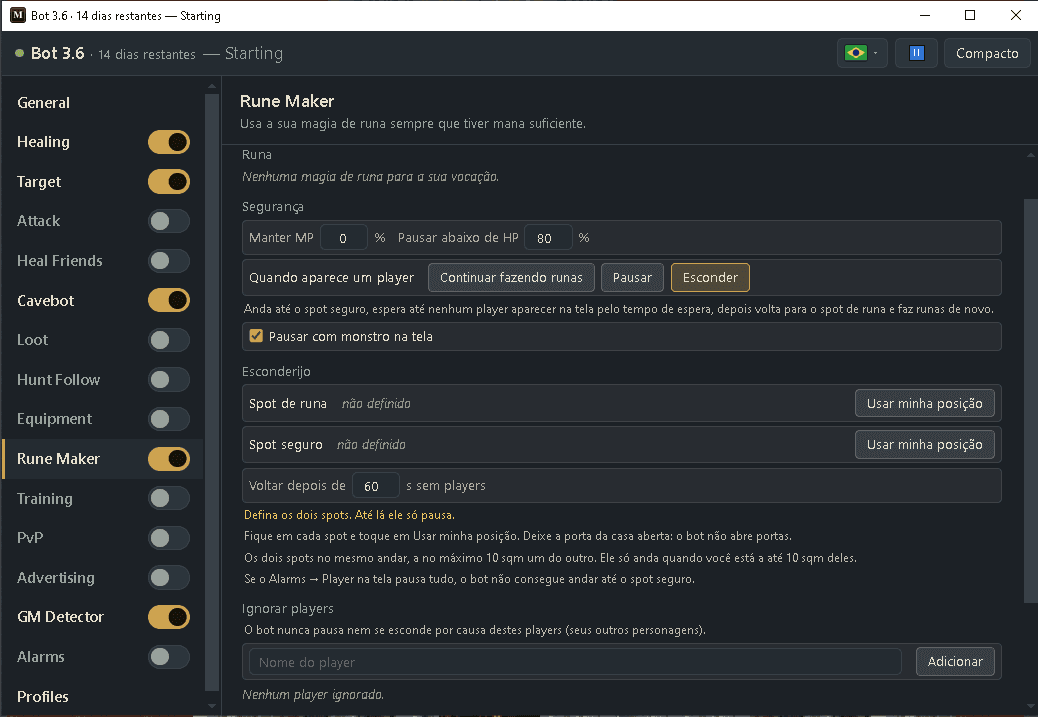
How to turn it on
- 1Click Bot, then ⤢ (All settings) and pick Rune Maker in the list.
- 2Choose the rune spell to make.
- 3Put a blank rune on your hotbar and turn on the game’s Auto Eat.
- 4Set the Safety options and choose what to do when a player shows up.
- 5To hide: stand on your rune spot and tap Use my position, then stand on the safe spot (inside your house) and tap it again.
- 6Add your other characters to Ignore players.
- 7Stand on the rune spot and turn Rune Maker on with its switch (in the compact view or in the list).
Settings, one by one
The rune
Rune (spell)
The rune spell the bot casts whenever your mana allows. The menu shows the key, mana cost and soul cost.
Values: Any rune spell of your vocation that is on a hotbar key.
ExampleSudden Death Rune → F8 (985 mana, 5 soul)
Safety
Keep MP (%)
Only cast if your mana stays at or above this percent after the cast.
Values: 0 to 99. Default 0 (use all your mana).
Example0
Pause below HP (%)
Stop making runes while your health is below this percent.
Values: 0 to 99. Default 80. (0 = never.)
Example80
When a player shows up
What the bot does when another player is on your screen. Keep making runes: nothing changes. Pause: it stops and goes back to making runes by itself as soon as the screen is clear. Hide: it walks to your safe spot, waits, and walks back to the rune spot.
Values: Keep making runes, Pause or Hide. Default Pause.
ExampleHide
Pause with a monster on screen
Stop making runes when a monster appears near you.
Values: On by default.
Exampleon
Hide spot (when you choose Hide)
Rune spot
The square where you make runes, for example in front of your house. Stand on it and tap Use my position.
Values: Your position when you tap the button.
Example32345, 32207, 7
Safe spot
Where the bot hides when a player shows up, for example inside your house. Stand on it and tap Use my position.
Values: Same floor as the rune spot, at most 10 squares away.
Example32343, 32205, 7
Come back after (seconds)
How long the screen must stay with no players before the bot walks back to the rune spot. If a player shows up again, it waits again.
Values: 10 to 600. Default 60 (1 minute).
Example60
Ignore players
Ignore players
Players the bot never pauses or hides for, like your other characters. Type a name and tap Add, or tap + Ignore next to a player under On screen now.
Values: Up to 30 names.
ExampleMy Alt Druid
Ready example — making SD runes
- Rune: Sudden Death Rune → F8
- Keep MP: 0 (use all mana)
- Pause below HP: 80
- When a player shows up: Hide · Pause with a monster: on
- Rune spot: in front of the house · Safe spot: inside the house · Come back after: 60 s
- Ignore players: your other characters
- Stand on the rune spot and turn Rune Maker on.
When the game shows a captcha, the bot answers it by itself (“Solve the anti-bot captcha by itself” in the GM Detector, on by default). Rune making pauses meanwhile and starts again as soon as the captcha is gone. If you turned that option off, answer it yourself.
Put a blank rune on a hotbar slot so the bot can count your blanks, and turn on the game’s Auto Eat so you don’t run out of mana food.
Hide does not open doors: leave the house door open. If the bot can’t reach the safe spot it stays still, does not make runes and rings the alarm. It only walks when you are near the two spots and the Cavebot is off.
If Alarms → Player on screen is set to pause everything, the Rune Maker is paused too and can’t walk to the safe spot. Use Hide alone or turn that pause off.