
Attack
Module: Attack
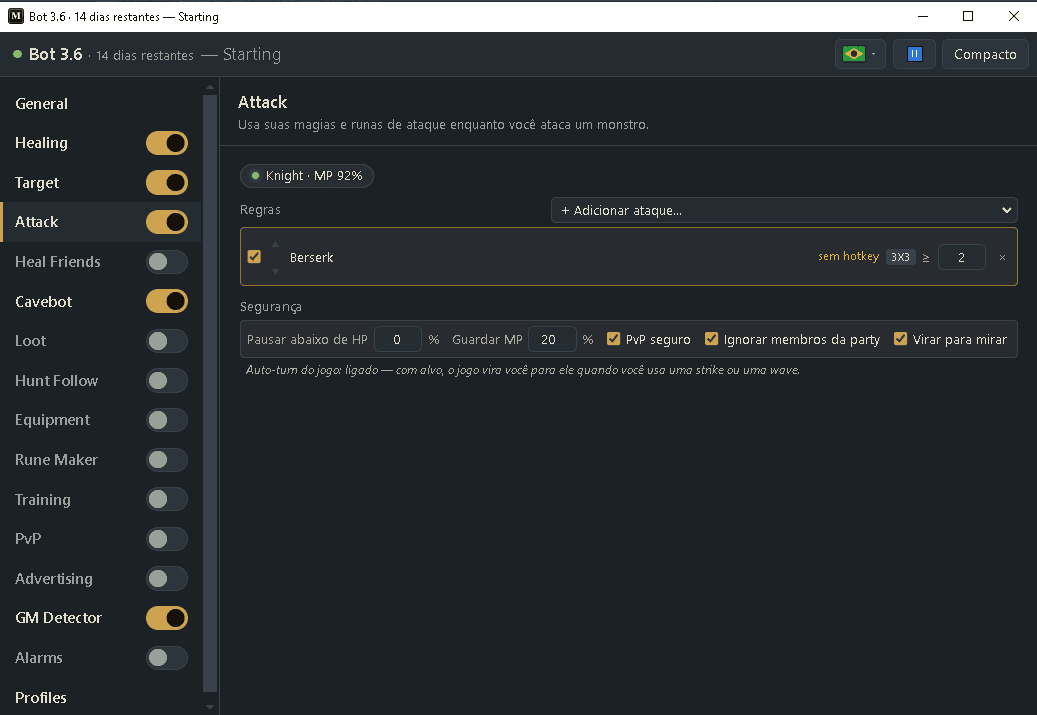
Casts your attack spells and runes while you have a monster targeted. You add your attacks in a list, top to bottom; the bot uses the first one that fits right now. Like Healing, it presses your hotbar keys — it never casts directly. Area runes can also auto-aim at the best spot (Crosshair), even with no target.
How to turn it on
- 1Click Bot, then ⤢ (All settings) and pick Attack in the list.
- 2Click “+ Add attack…” and add your spells and runes. Use ▲ ▼ to order them (top is tried first).
- 3For area attacks, set “≥” (how many monsters are needed).
- 4For an area rune, pick the aim: Target (on your target) or Crosshair (the bot finds the tile that hits the most monsters and clicks it).
- 5Set the Safety limits.
- 6Turn Attack on with its switch (in the compact view or in the list). Target attacks need a target (use the Target module); Crosshair area runes fire on their own at the biggest group.
Settings, one by one
Attack rules
+ Add attack…
Adds a spell or rune. Spells and runes are grouped in the menu. Runes must be on a hotbar key set to Target, or to use-with (crosshair) for the Crosshair aim.
Values: Up to 10 rules. Each has a checkbox, ▲▼ to reorder and × to remove.
Examplesudden death rune, great fireball rune
≥ (min monsters)
Only on area attacks (wave, beam, big area…). The attack fires only when at least this many monsters are in its area.
Values: 1 to 8. Default depends on the attack.
Examplegreat fireball rune → ≥ 3
Aim (Target / Crosshair)
Only on area runes. Target: the rune hits your selected monster (needs a target). Crosshair: the bot looks at the whole screen, finds the tile that hits the most monsters — behind walls don’t count — and clicks it, even with no target. It only fires while you stand still.
Values: Target (default) or Crosshair. For Crosshair, put the rune on a use-with (crosshair) hotbar key.
Examplegreat fireball rune → Crosshair
Safety
Pause below HP (%)
Stop attacking while your health is below this — so you focus on healing when you are in danger.
Values: 0 to 99. Default 50. (0 = never pause.)
Example50
Keep MP (%)
Never cast a spell that would drop your mana below this. Runes cost no mana, so they ignore this.
Values: 0 to 99. Default 20.
Example20
PvP safe
Blocks area spells and runes while another player is on your screen — so you don’t hit someone and get a skull.
Values: On by default.
Exampleon
Ignore party members
PvP safe doesn’t count players in your party, so you can keep using area attacks while hunting together.
Values: On by default.
Exampleon
Turn to aim
Turns your character (Ctrl + arrow) so strikes, waves and beams point at the monster before firing. If the game’s “Auto-turn Strike/Wave” option is on (the page shows “Game auto-turn: on”), the game turns you by itself and the bot just casts.
Values: On by default.
Exampleon
Ready example — a mage
- Rule 1: Sudden Death Rune → F6 (single target)
- Rule 2: Great Fireball Rune → F7, Crosshair, ≥ 3 monsters
- Pause below HP: 50 · Keep MP: 20
- PvP safe: on · Turn to aim: on
- Turn Attack on. The Crosshair fireball nukes the pack on its own; Target handles single-target finishing.
The colored tag on each rule (target, wave, beam, big area…) tells you the shape of the attack. Only area shapes use the “≥” setting.
Crosshair aim throws the area rune at the tile that hits the most monsters — great for packs — and works even with no target. Walls block it, so monsters behind a wall don’t count.
A rune rule needs its hotbar key set to the right mode: Target for Target aim, use-with (crosshair) for Crosshair aim. If the rule shows “set to Target” or “set to use-with”, fix that key.
Strikes (exori flam/vis/mort) only hit the tile in front of you. In the Target module, set the monster to “Chase & face” so the bot stands in front of it; then the strike always hits.
If a better attack is about to be ready (less than a fraction of a second), the bot waits for it instead of spending the cooldown on a weaker one.