
Target
Tab: Target / Movement → Target
Target picks which monster to attack by itself: the nearest, the one with the lowest life or the best one for your vocation. You list the monsters of your hunt and can let it switch target from time to time. It only aims at monsters in sight: walls and objects block them.
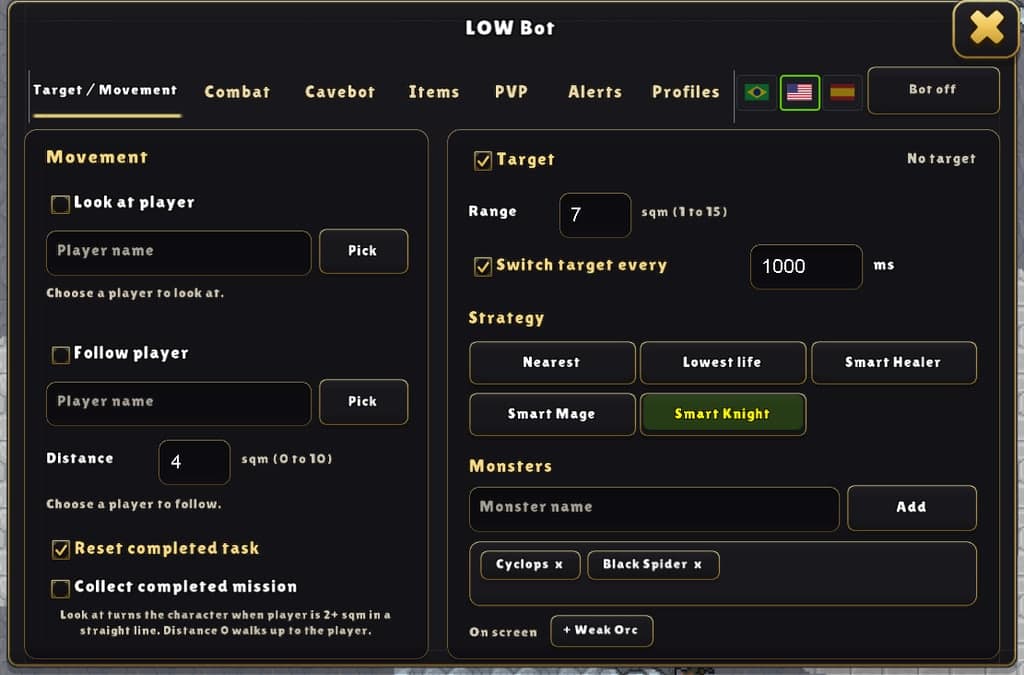
How to turn it on
- 1Open the Target / Movement tab.
- 2In Monsters, type a monster's name (or click a monster in the On screen list) and click Add. Leave the list empty to attack any monster.
- 3Choose the Strategy and the Range.
- 4Tick the Target checkbox and turn the bot on.
Settings, one by one
Which monsters
Monsters
The monsters the bot may attack, by their exact name (upper or lower case doesn't matter). If the current target is not on the list, the bot lets it go.
Values: Any monster in the game. Empty list: attacks all of them.
ExampleCyclops, Black Spider
Range
How many sqm around your character it looks for monsters.
Values: 1 to 15. Default 6.
Example7
How it chooses
Strategy
Nearest: the closest monster. Lowest life: the one with the least life (in points, not in %). Smart Healer and Smart Mage: the monster with the most monsters around it, so your area spell hits more of them. Smart Knight: the side of your character with the most monsters right next to it, so your hit catches more of them.
Values: Nearest, Lowest life, Smart Healer, Smart Mage, Smart Knight.
ExampleSmart Mage for a mage, Smart Knight for a knight
Switch target every (ms)
With the checkbox ticked, it picks the target again at each interval, even if the current one is still alive. This helps with the Smart strategies, because the best monster changes as the hunt moves.
Values: 0 to 60000 ms (1000 = 1 second). Default 2000.
Example1500
Time variation (%)
On the Strategy row. It makes the bot's timing vary more: each wait of the Target, the heal, the potions and the attack comes out between the normal time and the normal time plus this percentage. 0 keeps the normal time.
Values: 0 to 15%. Default 0.
Example10
Example: mage in a Cyclops hunt
- Add Cyclops to Monsters.
- Strategy Smart Mage, Range 7.
- Tick Switch target every 2000 ms.
- Tick Target and turn the bot on. The runes and spells are in the Combat tab.
Water and holes don't block the view; walls and objects do. For a knight, the bot also checks that it can walk there: across a river, the mage aims and the knight doesn't.
Target picks and marks the target. The attack runes and spells are in the Combat → Attack tab: set up both.