
NPC refill
Tab: Items → Refill
NPC refill: next to the NPC, the bot buys potions and runes, sells your loot and deposits items and gold, without opening a window or the chat. It sends the same request the NPC window sends.
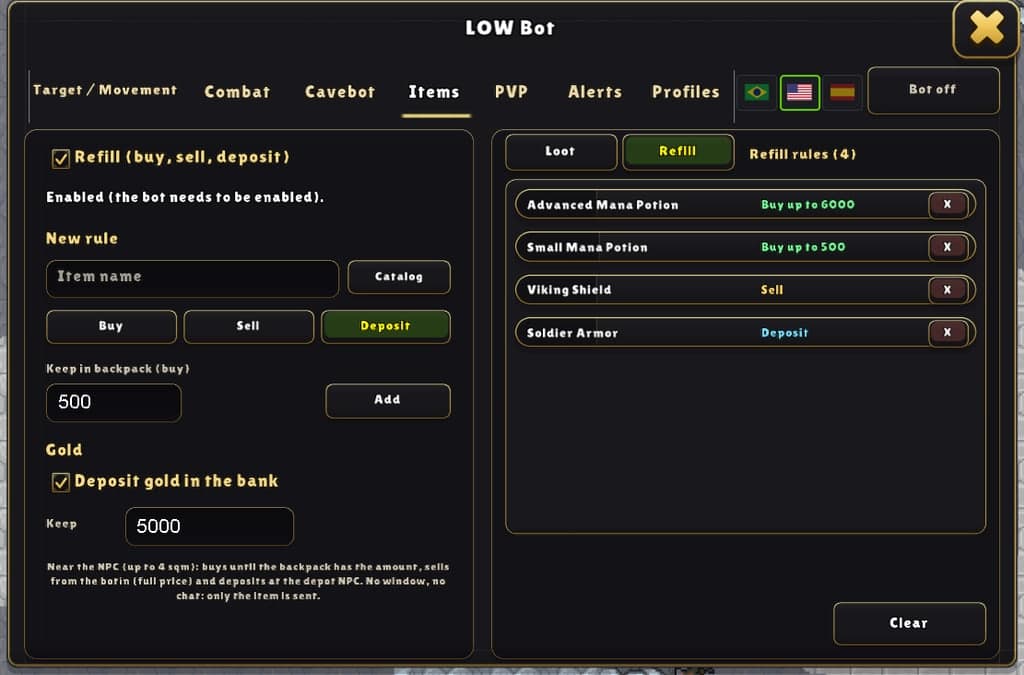
How to turn it on
- 1Open the Items tab and click Refill, at the top right.
- 2Type the item (or use the Catalog), choose Buy, Sell or Deposit and the amount, and click Add.
- 3If you want to store your gold, tick Deposit gold in the bank and set the Keep value.
- 4Tick Refill (buy, sell, deposit), turn the bot on and take your character to the NPC.
Settings, one by one
Rules
Buy
Buys until your backpack has the amount set in Keep in backpack. With no gold, it stops and tells you.
Values: Amount from 1 up.
ExampleMedium Mana Potion, 200
Sell
Sells the item from the loot bag at full price. From the backpack the NPC pays only 10%, so the bot doesn't sell from the backpack.
ExampleViking Shield
Deposit
Stores the item at the deposit NPC.
ExampleSoldier Armor
Gold
Deposit gold in the bank / Keep
At the bank NPC, deposits the gold above the Keep value.
Values: Keep, in gold.
ExampleKeep 5000
Sell All Loot
Like the Sell All Loot button of the shop in the game: near the shop (up to 4 sqm), it sells at once everything in your loot bag that the NPC buys. Your backpack stays. It works even with the Refill box unticked.
ExampleTicked, with a Go to the shop in the Cavebot
Example: mage refill
- Buy Medium Mana Potion, Keep in backpack 200.
- Sell Viking Shield.
- Deposit gold in the bank, Keep 5000.
- Tick Refill and stop your character next to the NPC.
The NPC must be within 4 sqm, on your floor. If it is farther away, the status says Waiting for an NPC.
One request per second, in this order: sell, deposit, buy and gold. If the NPC refuses the same action 3 times (no room, out of stock), that rule pauses for 1 minute.