
Loot
Tab: Items → Loot
Auto loot: the bot picks up the loot within 1 sqm of your character, without walking, with the game's own Loot button. You choose what to ignore (throw away) and what to move from the loot bag (the game's “botín”) to the backpack.
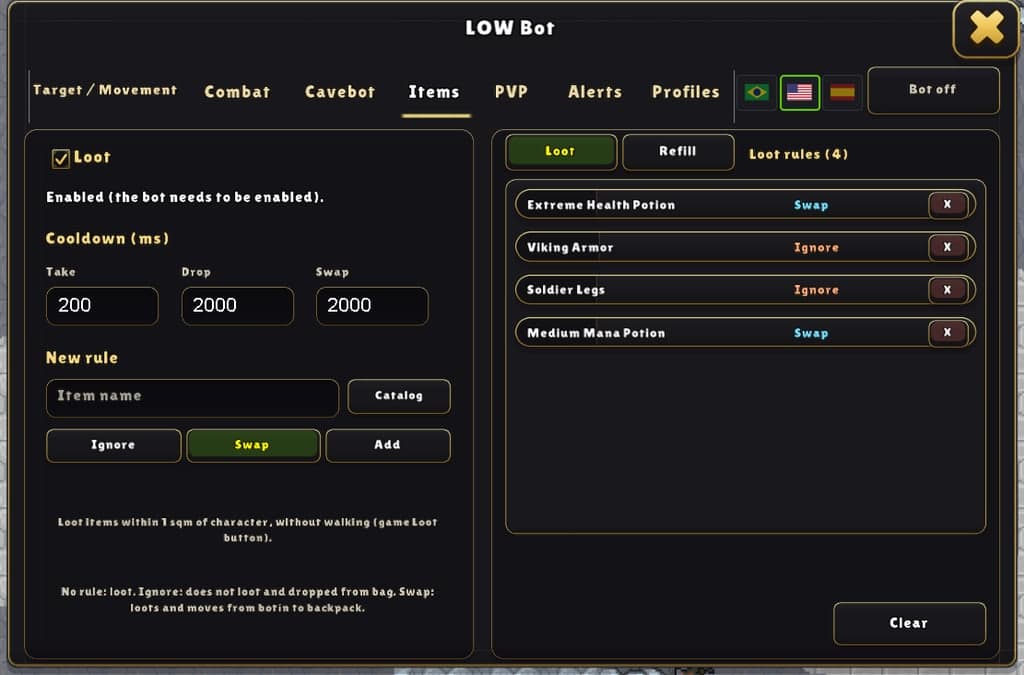
How to turn it on
- 1Open the Items tab (Loot button, at the top right).
- 2For each exception, type the item name (or use the Catalog), choose Ignore or Swap and click Add.
- 3Tick Loot and turn the bot on.
Settings, one by one
Rules
No rule
The item is picked up. With no rules at all, the bot picks up everything nearby.
Ignore
On its own, this item doesn't make the bot press Loot and, if it is in the loot bag or the backpack, it is dropped.
ExampleViking Armor
Swap
Picks up the item and moves it from the loot bag to the backpack.
ExampleMedium Mana Potion
Catalog
The list of every item in the game, with icons and a name filter. Click an item to fill in its name.
Cooldown (ms)
Take, Drop and Swap
The minimum time between one action and the next of the same kind.
Values: Default 200 (Take), 2000 (Drop) and 2000 (Swap).
Example
- Ignore: Viking Armor and Soldier Legs.
- Swap: Medium Mana Potion.
- Tick Loot and turn the bot on.
With the loot bag full, the bot doesn't press Loot and says so in the status. If the loot doesn't come out (another player's, for example), it gives up after 5 tries and waits for the ground to change.