
Potions
Tab: Combat → Potions
Auto potion: the bot drinks life and mana potions by itself. Life potions use the HP%, mana potions use the MP%, and the Paladin's blended potion uses both.
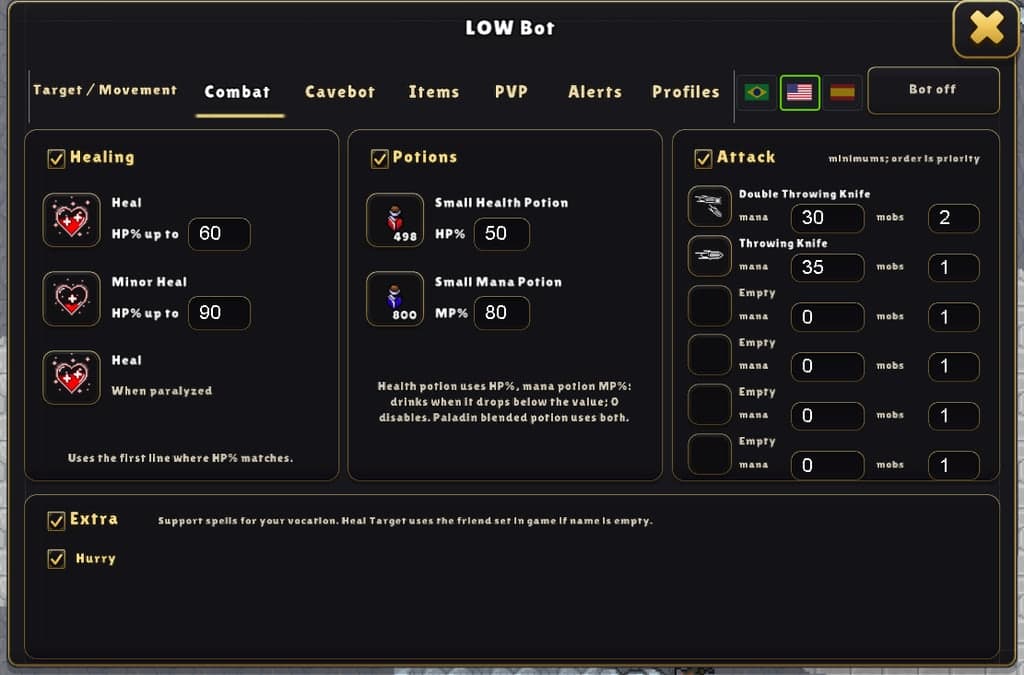
How to turn it on
- 1Open the Combat tab.
- 2In Potions, click the row and choose the potion. The list shows how many you have in your backpack.
- 3Set the HP% (life potion) or the MP% (mana potion).
- 4Tick Potions and turn the bot on.
Settings, one by one
Potion (row 1 and 2)
The potion of the row. The bot only uses what is in your backpack: if it runs out, it tries the other row.
Values: The game's potions.
ExampleAdvanced Mana Potion
HP% / MP%
Drinks when your life (or mana) goes below the value. A life potion shows only HP%, a mana potion only MP%. If you change the potion, the value stays.
Values: 0 to 100. 0 turns the row off.
ExampleMP% 60
Blended (Paladin)
The potion that restores both life and mana has both boxes on the same row: it drinks when either one matches.
Values: HP% and MP%, 0 to 100.
Example: mage
- Row 1: Advanced Mana Potion, MP% 60.
- Row 2: Extreme Health Potion, HP% 40.
- Tick Potions and turn the bot on.
There is 1 second between one potion and the next, so no potion is wasted.