
Alerts
Tab: Alerts
Alerts play a sound, pause the bot or log you out when a player shows up, someone pushes you, your supplies run low or your bag gets full. Each alert has its own three options.
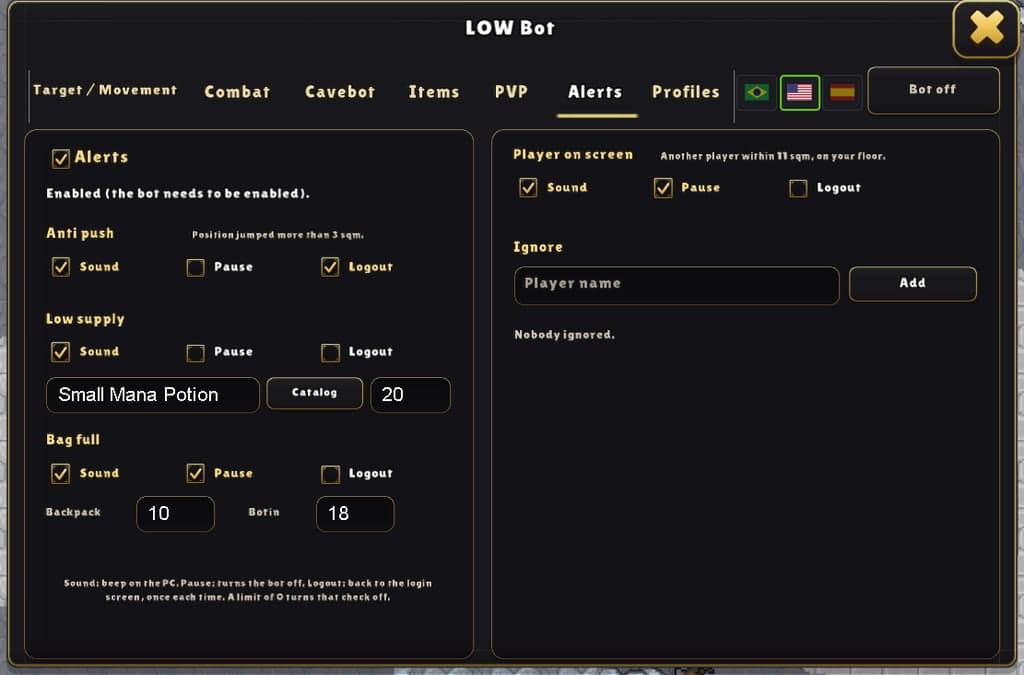
How to turn it on
- 1Open the Alerts tab.
- 2In each alert, tick Sound, Pause and/or Logout.
- 3Choose the item and the Limit of Low supply, and the limits of Bag full.
- 4Tick Alerts and turn the bot on.
Settings, one by one
The alerts
Anti push
Your position jumped more than 3 sqm at once, on the same floor. Stairs, teleports and dying don't count.
Player on screen
Another player within 11 sqm, on your floor. Players in Ignore don't count.
Low supply
The amount of the item in your backpack reached the Limit.
Values: Item by name or from the Catalog. Limit 0 turns it off.
ExampleMedium Mana Potion, Limit 20
Bag full
The backpack (Backpack) or the loot bag (Botín) reached this number of used slots.
Values: 0 turns each one off.
ExampleBackpack 10, Botín 18
What each alert does
Sound
Beeps on the PC, a different sound for each alert. It repeats every 2 s while the alert lasts.
Pause
Turns the bot off, like the Bot off button.
Logout
Goes back to the game's login screen, once each time the alert fires.
Ignore
Players who don't trigger Player on screen, like your team.
Values: Player name.
Example: hunting alone safely
- Player on screen: Sound and Pause.
- Anti push: Sound and Logout.
- Low supply: Medium Mana Potion, Limit 20, Sound.
- Put your team in Ignore.
The characters panel also shows the last alert of each character.