
Mirage Engine Auto Target, Auto Loot, hotkeys and Cavebot in Mirage Realms
It plays Mirage Realms for you. The bot picks the monster, uses your hotkeys at the right moment, opens the loot, walks your hunting route and beeps when a GM shows up, while you do something else.
Windows (a single .exe, no Java to install)
 Mirage Engine - Char 1 [Aldric (1031, 348)] - 30 days left
The bot's screens
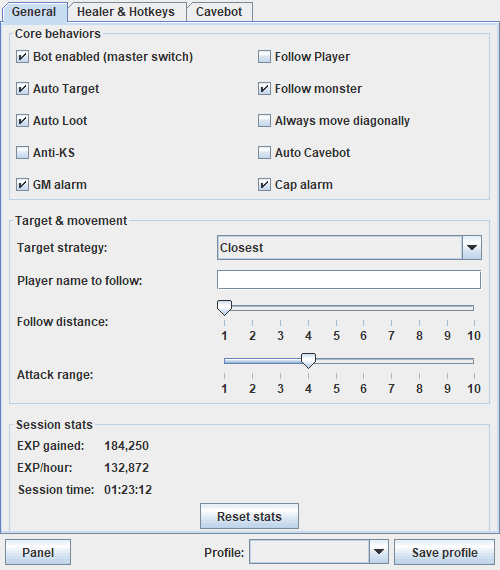
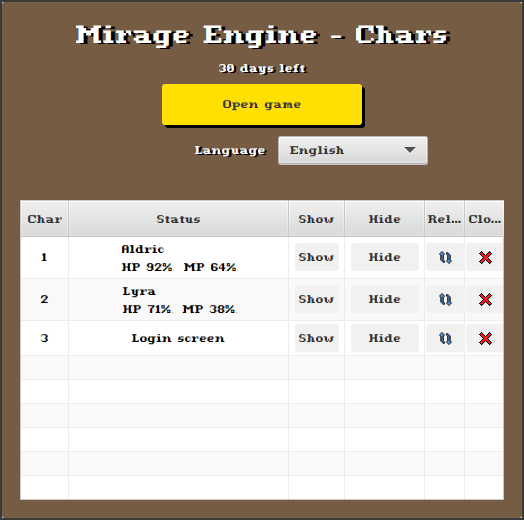
Real prints of Mirage Engine: three tabs in the bot window and the panel that opens your chars, in English, Portuguese, Spanish and Polish.
General
Every switch on one screen: Auto Target with its strategy and Attack range, Auto Loot, Anti-KS, Follow, the alarms and the session's EXP.
Healer & Hotkeys
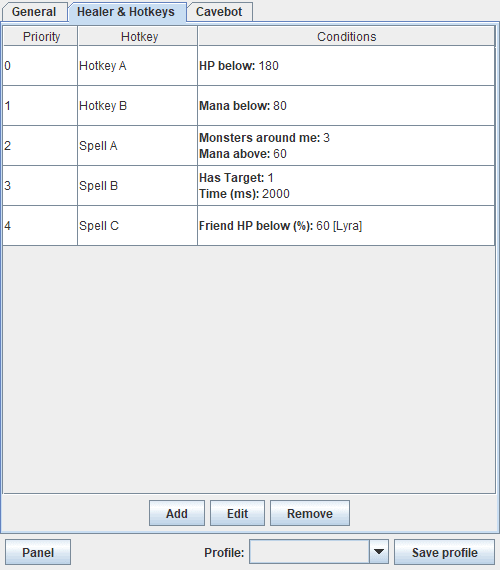
Your game hotkeys with a priority and conditions: HP, Mana, Target, monsters around and party and friend HP.
Cavebot
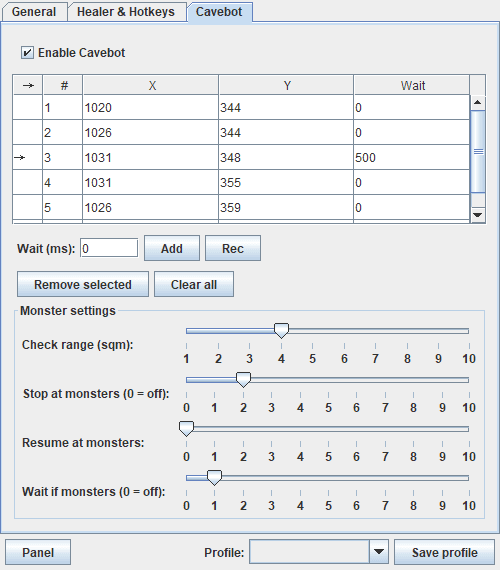
Record the route by walking, set a wait on each waypoint and choose when to stop, walk again and wait according to the monsters around.
Chars panel
Log in once and open as many games as you want. Each char shows its HP and MP, with Show, Hide, Reload and Close.
What the bot does
Each part has its own checkbox: turn on only what you want.
Auto Target
Picks the monster for you among the ones in your Attack range that your char can see: Closest, Lowest HP or Smart Mage, which goes for the monster with the most monsters next to it.
Auto Loot
Opens the loot near you and takes it while it fits in your cap.
Healer & Hotkeys
Uses the game's hotkeys and spells by priority, each with its conditions: HP, Mana, time, Target and monsters around.
Cavebot
Walks your route of waypoints in a loop. Record it by walking, set a wait per waypoint and stop when many monsters are near.
Follow
Follows a Player by name or goes after the monster, at the distance you choose, and can always stand diagonal to the Target.
Alarms
Beeps when someone from the game's team shows up on your screen (GM alarm) and when the loot no longer fits in your cap (Cap alarm).
Anti-KS
Leaves alone the monsters that have another player close by.
Profiles
Saves your whole setup with a name and loads it again from the list, on any char.
Session stats
EXP gained, EXP per hour and session time, with a button to reset.
Several chars
Log into the bot once and open as many games as you want on the same computer, each char with its own bot window.
Four languages
English, Portuguese, Spanish and Polish, changed on the chars panel for every window at once.
Windows (a single .exe, no Java to install)
News
What came in the newest version, released on November 17, 2026:
- Bug fixes and improvements.
- Download the new version here on the site, on the Download page.
Frequently asked questions
What players ask before they start.
Do I need to install anything?
No. Mirage Engine is a single file with everything inside, Java included: download it, open it and log in with your account.
Can I play more than one char?
Yes, at no extra cost. You log into the bot once and click Open game for each char. Each one opens its own game and its own bot window, and the panel shows the HP and MP of all of them.
Do I need to set up hotkeys?
The bot uses the hotkeys and spells you already have on the game's bar. In the bot you only say when each one is used: below how much HP or Mana, with how many monsters around, every how many milliseconds.
Is it hard to set up?
No. Tick the switches, add your hotkeys and follow the guide: every option is explained in plain words, with an example. Then save it all as a profile.
Which languages does it speak?
English, Portuguese, Spanish and Polish. You choose on the chars panel and every window changes at once.
How to get access
- 1
Create your account on the site with the username and password you want.
Sign up - 2
Pix (R$ 30) or PayPal ($7 USD): message us on Discord with your username and we'll send you the payment details.
- 3
Binance ($6 USDT): pay using the ID below and send the proof on Discord with your username.
- 4
We turn your account on as soon as we see the payment, usually in the evening (Brasília time).
- PixR$ 30
- Binance$6 USDT
- PayPal$7 USD
for 30 days
Open as many characters as you want, at no extra cost. Runs on PC (Windows) only, on one computer at a time.
Binance ID