
Several characters (multi-char)
Tab: Profiles → Characters panel
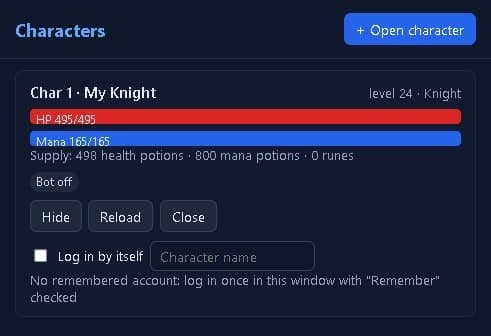
Open as many characters as you want in the same app (multi client), each in its own window, with a panel that shows the life, mana, supply and alerts of each one.
How to turn it on
- 1Sign in to the bot: the characters panel is the first window. To open it again, use Characters panel (multi-char) in the Profiles tab.
- 2In the panel, click + Open character: a new game window opens.
- 3In that window, log into the game with your Low account.
- 4Repeat for each character: there's no limit on how many you open.
Settings, one by one
The panel
Character card
Name, level, vocation, life, mana, supply (life potions, mana potions and runes), bot on or off, and the last alert.
Values: No limit: as many characters as you want.
Show / Hide
Takes the window off the screen and off the taskbar. The game and the bot keep running.
Reload / Close
Reloads the game page of that window, or closes the window.
Language flags
The flags at the top of the panel (Portuguese, English, Spanish and Polish) change the language of every window at once.
Example: two characters
- Sign in to the bot: the panel opens. Click + Open character and log in with the first character.
- Click + Open character again and, in the new window, log in with the second character's account.
- Turn on the bot in each window, each with its own setup.
- Follow both from the panel: life, mana, supply and alerts of each one.
Each window has its own login, its own setup and its own profiles. Use the newest version of the app.