
Healing
Tab: Combat → Healing
Auto heal: the bot casts your healing spell (or the Life Healing rune) when your life drops to the % you choose. There are two rows, the top one comes first, plus a separate heal for when you get paralyzed.
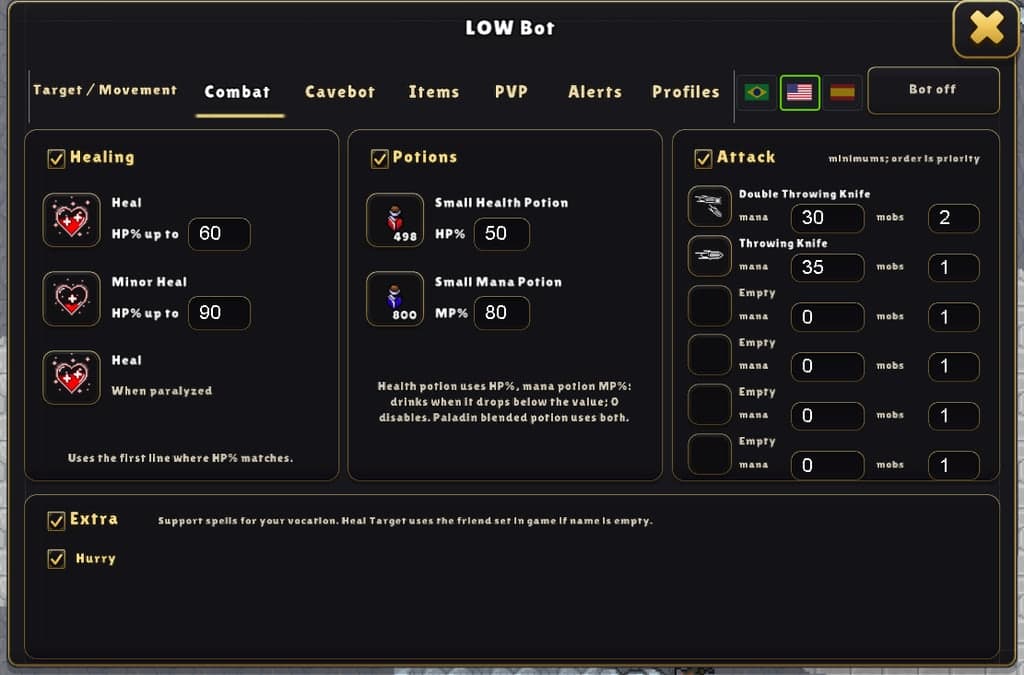
How to turn it on
- 1Log into the game and open the Combat tab.
- 2In Healing, click the first row and choose your heal. The list only shows what your vocation and level can use.
- 3Set the HP% up to of each row.
- 4In Healing against paralyze, choose the spell for When paralyzed.
- 5Tick Healing and turn the bot on.
Settings, one by one
Healing rows
Healing (row 1 and 2)
The healing spell or rune. The first row whose HP% matches is used. An empty row is off.
Values: The heals of your vocation and level, such as Heal and Strong Heal.
ExampleRow 1: Strong Heal; row 2: Heal
HP% up to
Heals when your life is at this % or below, and only if you have the mana for the spell.
Values: 0 to 100. 0 turns the row off.
ExampleRow 1: 50; row 2: 85
Paralyze
When paralyzed
The heal cast every time your character gets paralyzed, to remove the paralysis right away.
Values: Any heal on the list.
ExampleHeal
Example: knight
- Row 1: Strong Heal, HP% up to 50.
- Row 2: Heal, HP% up to 85.
- When paralyzed: Heal.
- Tick Healing and turn the bot on.
The bot respects the game's cooldown: it doesn't waste mana or cast two heals at once.
The spells only show up while you are in the game: outside it the list is empty.