
Cavebot
Tab: Cavebot → Route and Stop
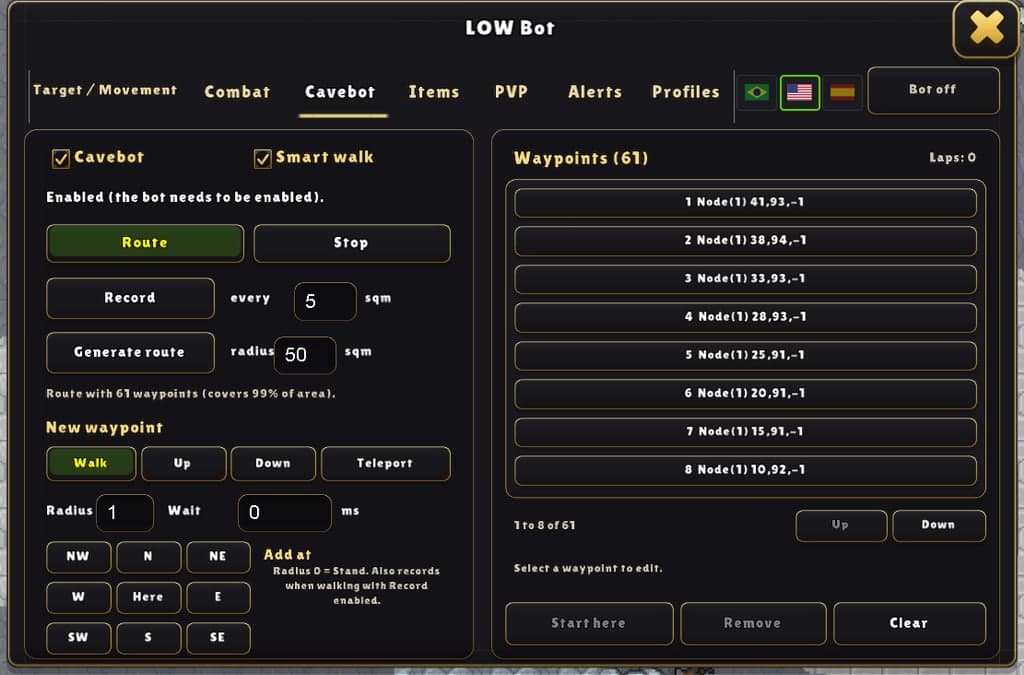
The Cavebot walks your hunting route by itself, in a loop, and stops to fight. Record the route by walking it, generate a whole route from the map or add each point by hand, with stairs and teleports.
How to turn it on
- 1Open the Cavebot tab, Route sub-tab.
- 2Click Record and walk through the hunt; at the end, click Stop recording. Or use Generate route.
- 3In the Stop sub-tab, set when it stops because of monsters.
- 4Tick Cavebot and Smart walk and turn the bot on, together with Target and Attack.
Settings, one by one
Route
Record / Stop recording
Records a waypoint where you are and another one every N sqm you walk. Going up and down stairs and stepping on a teleport are recorded too. Recording turns the Cavebot off.
Values: every 1 to 20 sqm. Default 5.
Exampleevery 5 sqm
Generate route
Builds by itself a circuit that covers the hunting area around you, on the current floor, up to the radius. It replaces the current list.
Values: radius 10 to 150 sqm. Default 50.
Exampleradius 40
New waypoint
The type (Walk, Up, Down, Teleport), the Radius and the Wait of the next waypoints. Radius 0 is a Stand (the exact tile); bigger is a Node (it gets within N sqm). Wait is how long it stands still when it arrives.
Values: Radius 0 to 10. Wait in ms.
Add at
The NW N NE / W Here E / SW S SE grid creates the waypoint on your tile or on the one next to it. For stairs and teleports, stand next to them and click their direction.
Waypoint list
Select a waypoint to change its Radius and Wait, Edit (Label and Go to), Start here or Remove. Clear asks you to Confirm.
Values: Up to 1000 waypoints.
Label and Go to (go to the NPC and back)
Label
Names a point of the route, like hunt or refill. It doesn't walk: it is where a Go to lands. It goes in after the selected waypoint, or at the end of the list.
Values: Name up to 40 characters.
ExampleLabel: refill
Go to
Sends the route to a Label. With no condition, it always goes. With conditions, it goes when any of them is true; if none is, the route moves on to the next waypoint.
Values: Up to 8 conditions.
ExampleGo to refill if Small Mana Potion < 20
Go to conditions
An item (type the name or pick it in the Catalog) below an amount, for supply running out; Backpack free slots below an amount; Botín free slots below an amount. Each line has its own Add button, and the list shows the conditions with an X to remove them.
Values: Amount from 1 to 99999.
ExampleBackpack free slots < 5
Edit
Select the Label or the Go to in the list and click Edit. Renaming a Label also renames it in the Go to lines that point to it.
Stop
Stop when attacking
Ticked (default), it stops walking while it attacks. Unticked, it walks while attacking and only stops by the rules below.
Monster range
Up to how many sqm away it counts monsters. It only counts monsters it can reach by walking: behind a wall or water they don't count.
Values: 1 to 15. Default 6.
Stop with / Resume walk with
Stops when there are at least this many monsters and only walks again when there are no more than the second number left.
Values: Stop with 1 to 15 (default 8); Resume walk with 0 to 15 (default 1).
ExampleStop with 4, Resume walk with 1
Leave SQM with up to
With the checkbox ticked, when it reaches a waypoint it only moves on when there are no more than this many monsters (0 = all clear).
Values: 0 to 15 monsters.
General wait
Extra time at each waypoint, added to the waypoint's own wait.
Values: In ms.
Smart walk
After chasing a monster, it doesn't go back to Nodes it already passed: it moves on to the next waypoint of the route.
Values: On by default.
Example: recording a hunt with stairs
- Stand at the start of the hunt and click Record (every 5 sqm).
- Walk through the hunt, go down the stairs, hunt down there and come back.
- Click Stop recording.
- Tick Cavebot, Smart walk, Target and Attack, and turn the bot on.
With no path for 5 s, or without getting closer for 8 s, it skips the waypoint. A waypoint on another floor or too far away: it goes to the next one on the current map.
The route is saved too when you save a profile.
Route with Refill: Label hunt, the hunt waypoints, Go to refill with the conditions, Go to hunt, Label refill, then the waypoints to the NPC and back. Near the NPC (up to 4 sqm), Refill buys and sells and the Cavebot waits for it to finish.