
Follow, Look at player and tasks
Tab: Target / Movement → Movement
Follows another player at the distance you choose, turns your character toward a player and takes care of tasks and missions: it repeats a completed task and collects a completed mission by itself.
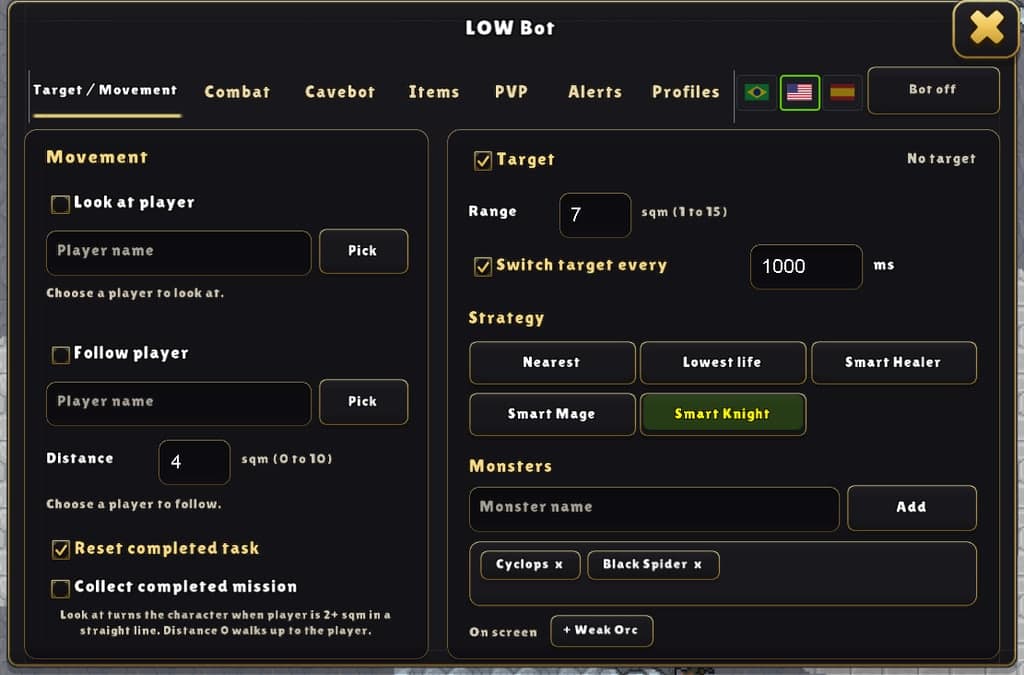
How to turn it on
- 1Open the Target / Movement tab.
- 2In Follow player, type the player's name or click Pick to choose someone on screen.
- 3Choose the Distance.
- 4Tick the checkboxes of what you want to use (Look at player, Follow player, Reset completed task, Collect completed mission) and turn the bot on.
Settings, one by one
Follow
Follow player
The player your character follows. If they leave the screen or change floor, the bot waits.
Values: Player name (upper or lower case doesn't matter).
Distance
How many sqm from the player your character stays. It looks for a free tile at that distance. Distance 0 goes right up to the player.
Values: 0 to 10 sqm.
Example2
Straight
With Straight ticked, your character always stays behind the player, at the set distance, on the side opposite to where they face. If the tile behind is taken, it uses the closest free one on the same line. Distance 0 counts as 1.
Values: On or off.
Look at player
Look at player
Turns your character toward the chosen player when they are 2 sqm or more away in a straight line (north, south, east or west). It only turns while your character is standing still.
Values: Player name, typed or chosen with Pick.
Tasks and missions
Reset completed task
A completed task the game lets you repeat (Time 1 or 2 of 3): the bot presses the game's Repeat button and closes the game window. On Time 3 of 3 it doesn't repeat: Claim is left to you.
Values: On or off. Starts off.
Collect completed mission
A completed mission: the bot presses Claim by itself.
Values: On or off. Starts off.
Clean screen
Hide numbers (damage, heal)
Removes the numbers that float up on the screen: damage, healing, mana, exp and loot. Works with the bot on or off.
Values: On or off. Starts off.
Hide spell effects
Removes the animations and projectiles of spells, runes and attacks. Fields on the ground (Magic Field, Earth Field) and boss area warnings still show. Works with the bot on or off.
Values: On or off. Starts off.
Example: hunting as a pair
- In Follow player, pick your friend, Distance 1.
- Tick Follow player and Reset completed task.
- Turn the bot on. With the leader on screen, the Cavebot waits and your character follows them.
The player names in Follow player and Look at player are saved too when you save a profile.