
Auto Target
Tab: General
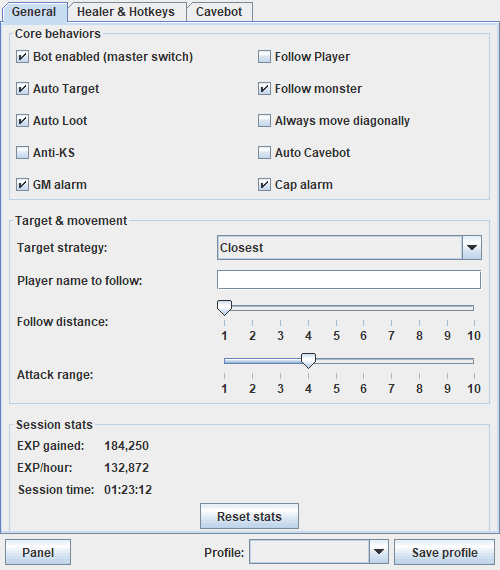
Auto Target picks the monster to attack by itself, among the monsters inside your Attack range that your char can see. You choose how it picks: the closest, the one with the lowest HP or, with Smart Mage, the one with the most monsters next to it. Anti-KS leaves alone the monsters other players are on.
How to turn it on
- 1Open the General tab.
- 2Choose the Target strategy and drag the Attack range.
- 3Tick Auto Target and, if you hunt where other players hunt, Anti-KS.
- 4Tick Bot enabled (master switch).
Settings, one by one
Which monster
Auto Target
Turns the automatic choice of the monster on. With no Target it picks one right away, and it keeps looking for a better one by the strategy you chose.
Values: On or off.
Target strategy
Closest: the nearest monster. Lowest HP: the monster with the least HP. Smart Mage: the monster with the most monsters right next to it (above, below, left and right), so an area attack on it hits more; on a tie, the one with the lowest HP.
Values: Closest, Lowest HP, Smart Mage.
ExampleClosest for melee, Smart Mage for area spells
Attack range
How many sqm around your char it looks for monsters. Monsters behind a wall, that your char can't see, are left out.
Values: 1 to 10 sqm. Default 4.
Example4
Other players
Anti-KS
With it ticked, the bot ignores the monsters that have another player within 4 sqm. Players who are in a party don't count.
Values: On or off.
Example: a mage hunting packs
- Target strategy: Smart Mage.
- Attack range: 5.
- Tick Auto Target and Bot enabled.
- In Healer & Hotkeys, add your area spell with the condition Monsters around Target: 3.
Auto Target chooses the monster. The hotkeys and spells used on it are set in Healer & Hotkeys.
Follow monster walks your char up to the Target when it is too far.