
Auto Loot
Tab: General
Auto Loot opens the loot that drops near you and takes it by itself, while it fits in your cap. With the Cap alarm you hear a beep when the loot no longer fits.
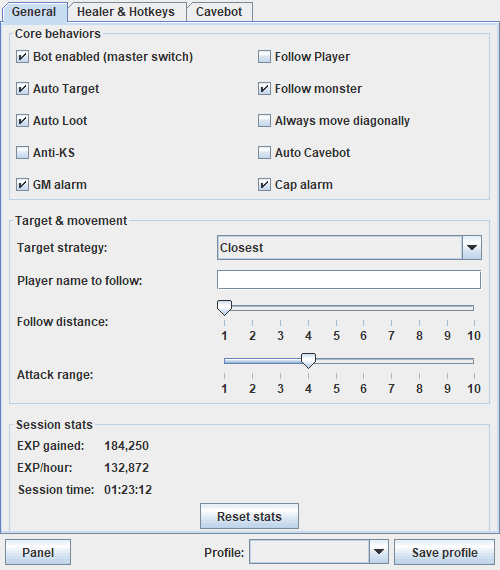
How to turn it on
- 1Open the General tab.
- 2Tick Auto Loot.
- 3Tick Cap alarm if you want to be warned when you are full.
- 4Tick Bot enabled (master switch).
Settings, one by one
What it does
Auto Loot
Opens the nearest loot within 4 sqm of your char. When the loot window opens, it takes everything if it fits in your cap; if it doesn't fit, it closes the window.
Values: On or off.
Cap alarm
Beeps when the loot you opened weighs more than the cap you have free. It needs Auto Loot on, because the check happens when the loot window opens.
Values: On or off.
Example: hunting without filling up
- Tick Auto Loot and Cap alarm.
- Hunt as usual: the bot opens and takes each loot.
- When you hear the beep, the loot no longer fits: go sell or store your items.
Auto Loot takes the whole loot: there is no list of items to choose from.