
Follow
Tab: General
Follow makes your char walk by itself: after a Player you name, after the monster you are attacking or, with Auto Cavebot, to the nearest monster it can reach. Always move diagonally keeps your char diagonal to the Target.
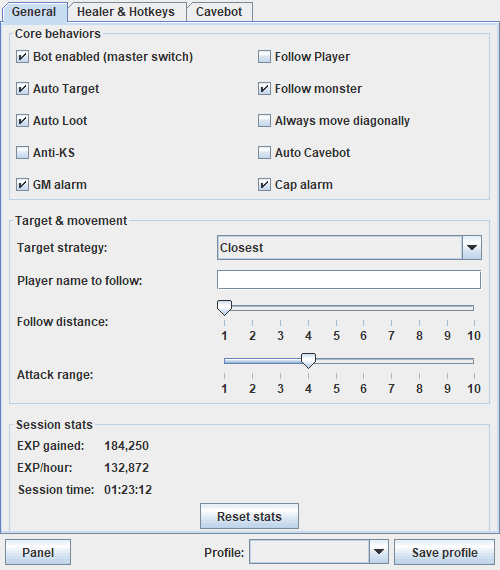
How to turn it on
- 1Open the General tab.
- 2To follow a player, type the name in Player name to follow and tick Follow Player.
- 3To go after monsters, tick Follow monster.
- 4Drag the Follow distance and tick Bot enabled (master switch).
Settings, one by one
Following a player
Follow Player
Your char walks after the player whose name is in Player name to follow and stops when it is within the Follow distance. If the player isn't on screen, it waits.
Values: On or off.
Player name to follow
The player's name, as the game writes it. Upper or lower case doesn't matter.
ExampleLeader
Follow distance
How many sqm from the player, or from the monster, your char stops.
Values: 1 to 10 sqm. Default 1.
Example1 to stay next to them, 3 to follow from behind
Going after monsters
Follow monster
Your char walks up to your Target until it is within the Follow distance and in sight. Use it together with Auto Target.
Values: On or off.
Auto Cavebot
With Follow monster ticked, your char goes by itself to the nearest monster it has a path to, even with no Target and no route. It is a way to hunt an open area without recording waypoints.
Values: On or off.
Always move diagonally
When your Target is close and on the same row or column as your char, the bot takes one step to the side, so you stand diagonal to it.
Values: On or off.
Example: following the leader of a hunt
- Player name to follow: Leader.
- Follow distance: 2.
- Tick Follow Player, Auto Target and Bot enabled.
- Your char walks behind the leader and attacks what comes into your Attack range.
While the Cavebot is walking the route, it comes first: Follow monster and Always move diagonally wait for it.