
Alarms
Tab: General
The alarms warn you with a sound while the bot plays: the GM alarm when someone from the game's team shows up on your screen, and the Cap alarm when the loot no longer fits in your cap.
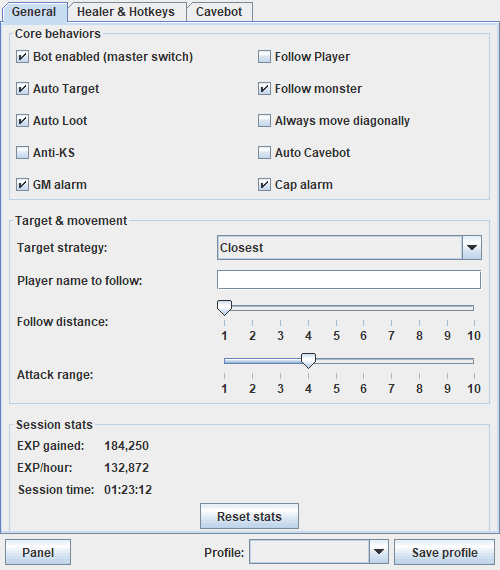
How to turn it on
- 1Open the General tab.
- 2Tick GM alarm, Cap alarm or both.
- 3Tick Bot enabled (master switch).
- 4Keep your computer's sound on.
Settings, one by one
The two alarms
GM alarm
Beeps once a second while someone from the game's team is on your screen, and for a few seconds after they leave.
Values: On or off.
Cap alarm
Beeps when the loot you opened weighs more than the cap you have free. It works together with Auto Loot.
Values: On or off.
Example: playing with the sound on
- Tick GM alarm and Cap alarm.
- Leave the bot hunting and do something else near the computer.
- When you hear the beep, look at the game: someone from the game's team is on screen or your cap is full.
An alarm only makes a sound: the bot doesn't stop or close the game by itself.
The chars panel also shows ! GM or ! Cap on that char's line for about a minute, and the char's window flashes on the taskbar.
The beep is a Windows sound: with Windows muted you won't hear it.