
Healer & Hotkeys
Tab: Healer & Hotkeys
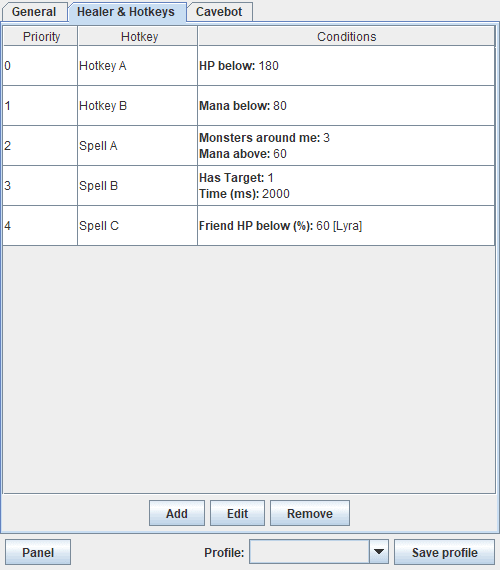
Healer & Hotkeys uses the hotkeys and spells of the game's bar for you: potions, healing, attack spells, buffs. Each line is one hotkey with a priority and the conditions that must all be true for it to be used, such as HP below a value, a number of monsters around or a time between uses.
How to turn it on
- 1In the game, put the potion or the spell on a hotkey (A to F) or on a spell slot (A to C).
- 2In the bot, open the Healer & Hotkeys tab and click Add.
- 3Choose the Hotkey and its Priority.
- 4In New condition, choose the type, type the Value and click Add. Repeat for each condition.
- 5Click Save hotkey and, on the General tab, tick Bot enabled (master switch).
Settings, one by one
The list
Priority
The order the bot tries the hotkeys in: the lowest number first. It uses the first hotkey whose conditions are all true and that the game lets it use at that moment.
Values: 0 to 100.
Example0 for the health potion, so it always goes first
Hotkey
Which slot of the game is used: Hotkey A to F or Spell A to C. Put the item or the spell on that slot in the game first.
Values: Hotkey A, B, C, D, E, F; Spell A, B, C.
Add, Edit, Remove
Add opens the window that creates a hotkey. Select a line and click Edit to change it or Remove to delete it.
Conditions (all true)
A hotkey is only used when every one of its conditions is true at the same time. A hotkey with no condition is used whenever the game allows it.
Time (ms)
At least this many milliseconds have passed since this hotkey was last used. Good for buffs and for spacing spells.
Values: In milliseconds: 1000 = 1 second.
Example2000
HP above, HP below
Your HP is at or above, or at or below, the value. The value is in HP points, not in percent.
ExampleHP below 180 for the health potion
Mana above, Mana below
The same for your Mana, in points.
ExampleMana below 80 for the mana potion; Mana above 60 so a spell doesn't leave you dry
Has Target
True while you have a Target. The Value doesn't matter for this one.
Monsters around Target
At least this many monsters on the Target's sqm and the 8 sqm around it, counting the Target itself.
Example3 for an area spell cast on the Target
Monsters around me
At least this many monsters on the 8 sqm around your char.
Example3
Target HP below (%)
The Target's HP is at or below this percentage.
Example30 to finish it off
Party HP below (%)
Someone of your party, close to you, has HP at or below this percentage.
Example60
Friend HP below (%)
The player whose name you type in the Player field, within 3 sqm of you, has HP at or below this percentage. The bot targets the friend, uses the hotkey and goes back to your monster.
Example60, Player: Lyra
The fields of a condition
Value
The number of the condition: HP or Mana points, milliseconds, a number of monsters or a percentage, depending on the type.
Rnd
With it ticked, the value is drawn again at each use, up to 10% above or below what you typed.
Player
The friend's name. Only Friend HP below (%) uses it.
Example: the four hotkeys of a hunt
- Priority 0, Hotkey A (health potion): HP below 180.
- Priority 1, Hotkey B (mana potion): Mana below 80.
- Priority 2, Spell A (area spell): Monsters around me 3 and Mana above 60.
- Priority 3, Spell B (single-target spell): Has Target and Time (ms) 2000.
The HP and Mana conditions use points. When your char's HP grows, review the values.