
Cavebot
Tab: Cavebot
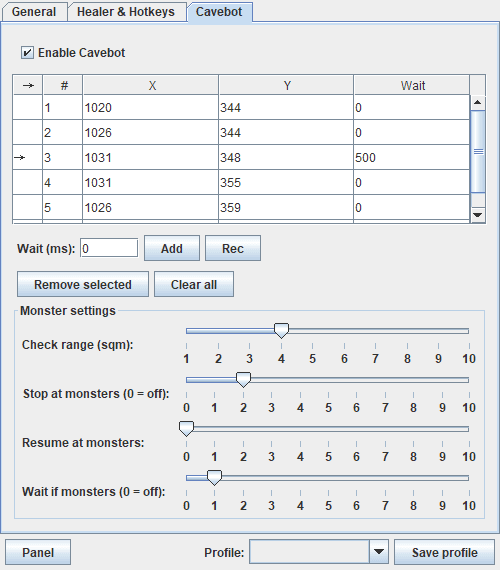
The Cavebot walks a route of waypoints in a loop, so your char goes around the hunt by itself. You build the route by recording while you walk or by adding the spot you are standing on, give each waypoint a wait, and choose when the char stops because of the monsters around.
How to turn it on
- 1Open the Cavebot tab and go to where the route starts.
- 2Click Rec and walk the route once: each sqm you step on becomes a waypoint. Click it again to stop.
- 3Or stand on a spot and click Add to add just that waypoint.
- 4Adjust the Monster settings.
- 5Tick Enable Cavebot and, on the General tab, Bot enabled (master switch).
Settings, one by one
The route
Enable Cavebot
Turns the walk along the route on. The char goes from the first waypoint to the last one and starts again from the first.
Values: On or off.
The waypoint list
Each line is a waypoint: its number, its position (X and Y) and its Wait. The arrow shows the waypoint the char is going to now.
Wait (ms)
How long the char stays on a waypoint before going to the next one. The value in the field goes to the waypoints you add or record after typing it.
Values: In milliseconds: 1000 = 1 second. 0 = doesn't wait.
Example500
Add
Adds the spot where your char is standing as a new waypoint, at the end of the list.
Rec
Starts recording: while the button shows REC in red, every new sqm you step on becomes a waypoint. Click it again to stop.
Remove selected
Deletes the waypoint selected in the list.
Clear all
Deletes the whole route.
Monster settings
Check range (sqm)
How many sqm around your char the monsters are counted for the three rules below.
Values: 1 to 10 sqm. Default 4.
Example4
Stop at monsters (0 = off)
The char stops walking when at least this many monsters are inside the Check range, so you fight them before going on.
Values: 0 to 10. Default 2. 0 turns it off.
Example2
Resume at monsters
After stopping, the char walks again when the monsters inside the Check range drop to this number or fewer. It only works with Stop at monsters above 0.
Values: 0 to 10. Default 0.
Example0 to walk again only when the area is clear
Wait if monsters (0 = off)
The Wait of a waypoint only counts when at least this many monsters are inside the Check range; with fewer, the char goes on without waiting. At 0 the char always waits the full time.
Values: 0 to 10. Default 1.
Example1
Example: a loop around a hunt
- Go to the start of the hunt, type 500 in Wait (ms) and click Rec.
- Walk the whole loop and come back to the start. Click Rec again.
- Check range 4, Stop at monsters 2, Resume at monsters 0, Wait if monsters 1.
- Tick Enable Cavebot, Auto Target and Bot enabled.
If the char can't move for a few seconds, or a monster is standing on the waypoint, it goes for the next waypoint instead.
The route is saved in the profile: save the profile after recording.