
Target
Tab: Target
Target picks which monster to attack by itself: the nearest, the farthest, the one with the lowest or highest HP. List the monsters of your hunt, or leave the list empty to attack all of them. It only picks monsters it can reach: on Archer and Mage, the ones your character sees; on Knight, the ones it has a path to. Your basic attack then runs on its own.
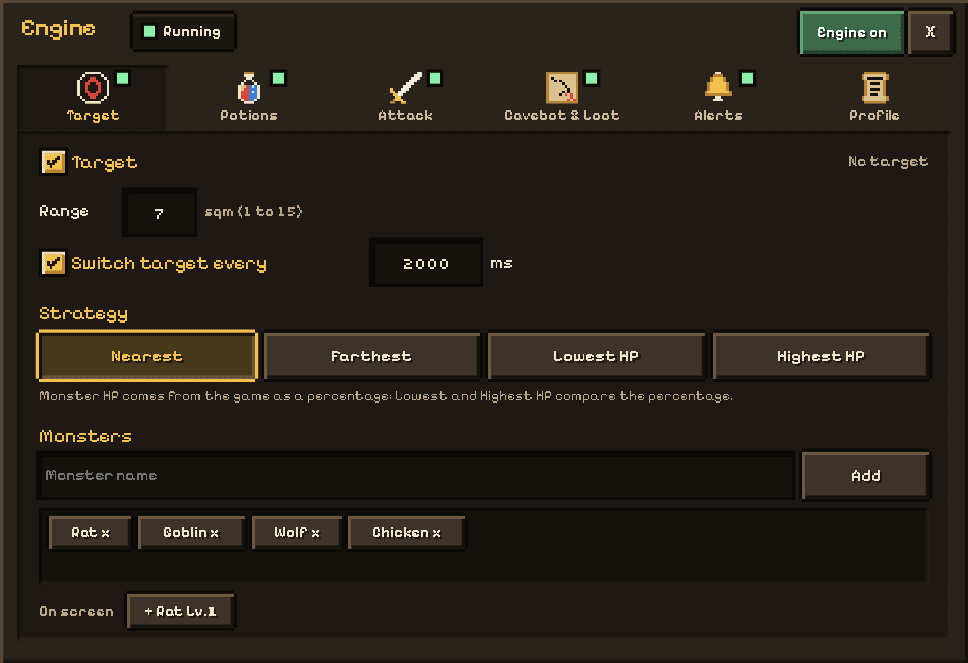
How to turn it on
- 1Open the Target tab.
- 2In Monsters, type a monster's name and click Add, or click a monster in the On screen row. Leave the list empty to attack any monster.
- 3Choose the Strategy and the Range.
- 4Tick the Target checkbox and turn the Engine on.
Settings, one by one
Which monsters
Monsters
The monsters the bot may attack, by name (upper or lower case doesn't matter). Click the x on a name to take it off the list.
Values: Up to 100 names. Empty list: attacks all monsters.
ExampleRat, Goblin, Wolf
On screen
A button for each monster on screen that isn't on your list yet. One click adds it, with the exact name the game uses.
Range
How many sqm around your character it looks for monsters.
Values: 1 to 15 sqm. Default 6.
Example7
How it chooses
Strategy
Nearest: the closest monster. Farthest: the one farthest away within the range. On Knight, the distance counts the steps of the path to the monster, not a straight line. Lowest HP and Highest HP compare the percentage of life, which is what the game shows.
Values: Nearest, Farthest, Lowest HP, Highest HP.
ExampleNearest for a knight, Lowest HP to finish monsters off
Switch target every
With the checkbox ticked, it picks the target again at each interval, even if the current one is still alive.
Values: 0 to 60000 ms (1000 = 1 second). Default 2000.
Example2000
Example: hunting Rats and Goblins
- Add Rat and Goblin to Monsters.
- Strategy Nearest, Range 7.
- Tick Switch target every, with 2000 ms.
- Tick Target and turn the Engine on. The special is in the Attack tab.
Archer and Mage only pick monsters your character sees, so they don't stand still attacking a monster behind a wall. Knight picks by the path to the monster, counting the steps. If the target goes behind a wall, the bot switches to another one.
If a monster still takes no damage, Target lets it go for a while and picks another one.
In a safe area the game doesn't allow attacks: the tab shows “Safe area: no attacks” and Target waits until you leave.