
Alerts
Tab: Alerts
Alerts warn you when something needs your attention: a GM or a player on screen, a private message, or your character dying. Each one can beep on your computer, pause the bot or log out, whichever you tick.
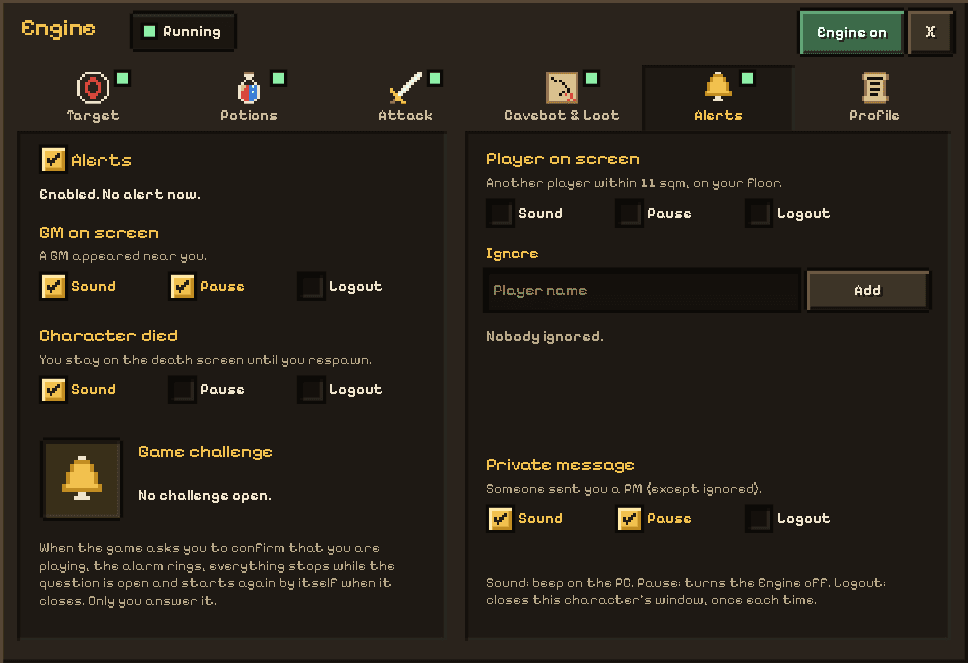
How to turn it on
- 1Open the Alerts tab. Alerts comes ticked.
- 2For each alert, tick Sound, Pause and Logout as you like.
- 3Add friends to Ignore so they don't set off the alert.
Settings, one by one
The alerts
GM on screen
A GM appeared near you.
Values: Sound and Pause by default.
Player on screen
Another player within 11 sqm, on your floor. Players on the Ignore list don't count.
Values: Off by default.
Private message
Someone sent you a PM, except the ignored ones.
Values: Sound and Pause by default.
Character died
You stay on the death screen until you respawn.
Values: Sound by default.
Game challenge
When the game asks you to confirm that you are playing, the alarm rings and everything stops until the question closes. Only you answer it.
Values: Always on.
What each action does
Sound
Beeps on your computer.
Pause
Turns the Engine off. Turn it back on when you are ready.
Logout
Closes this character's window, once each time.
Ignore
Player names that don't set off Player on screen or Private message.
Values: Up to 50 names.
ExampleYour friend's name
Example: hunting with friends
- Player on screen with Sound.
- Add your friends to Ignore.
- Keep GM on screen and Private message with Sound and Pause.
Alerts work with the Engine on. The exception is Game challenge, which always rings.