
Profile
Tab: Profile
A profile saves your whole setup with a name: Target, Potions, Attack, Cavebot and Loot. There are ready profiles for Knight, Archer and Mage, and you can keep up to 30 of your own.
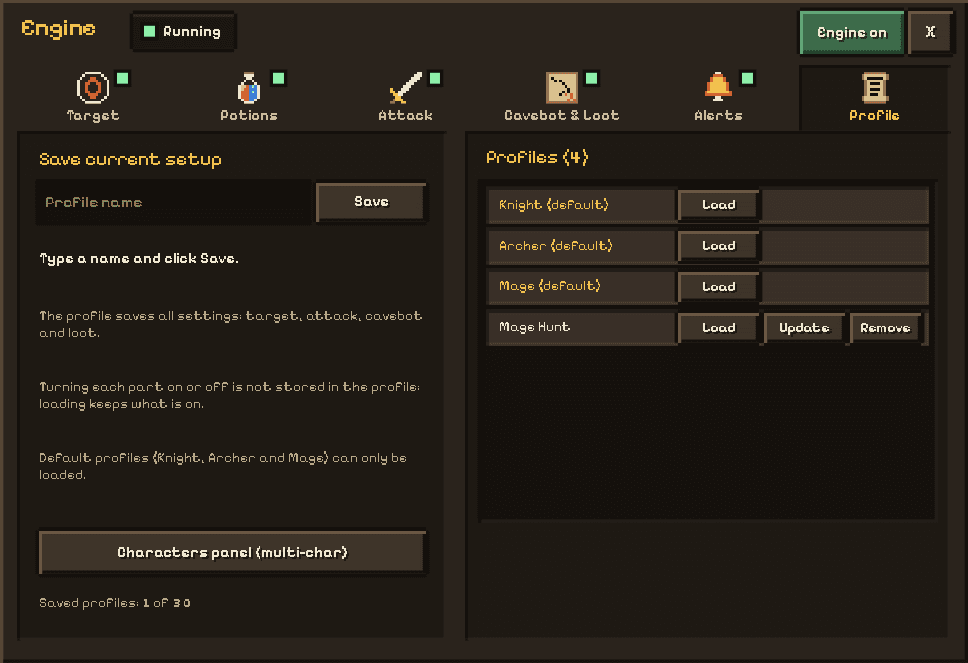
How to turn it on
- 1Open the Profile tab.
- 2To use a ready one, click Load on Knight, Archer or Mage.
- 3To save yours, type a name and click Save.
Settings, one by one
Buttons
Save
Saves the current setup under the name you typed. If the name already exists, the button becomes Replace.
Load
Puts that profile's setup in place. What is on stays on, and what is off stays off.
Update
Saves the current setup over that profile.
Remove
Deletes the profile (asks to Confirm).
Default profiles
Knight, Archer and Mage can only be loaded. To change one, load it, adjust it and save it with another name.
Example: your first setup
- Click Load on your class's profile.
- Add your monsters in Target and record the route in Cavebot.
- Back in Profile, type “My hunt” and click Save.
Profiles are saved on your computer, and every character sees the same list.