
Loot
Tab: Cavebot & Loot → Loot
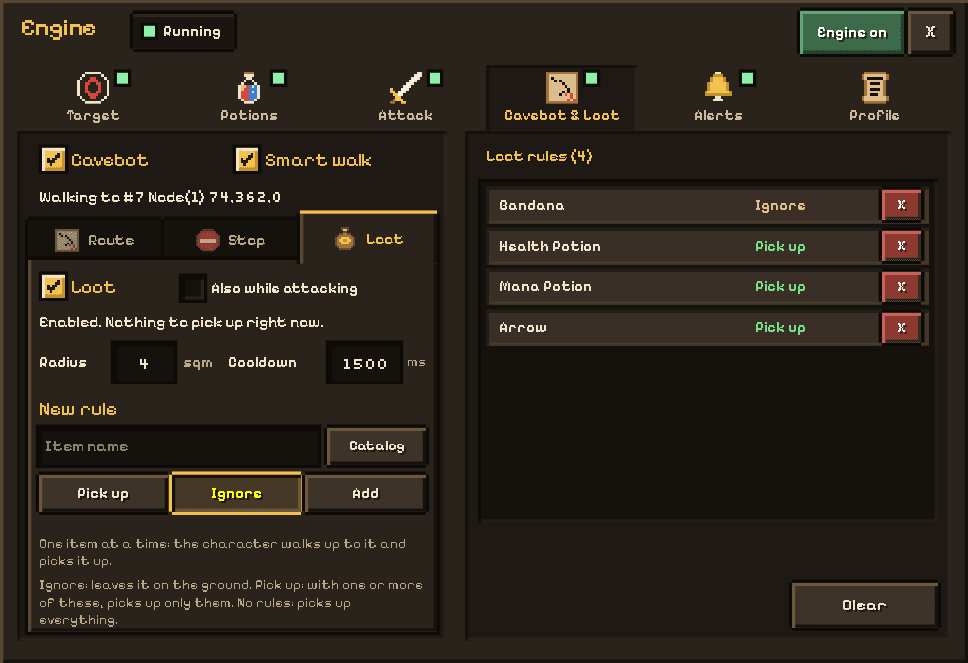
Loot walks up to the items on the ground and picks them up, one at a time, and checks that it got them. With no rules it picks up everything within the radius; with Pick up rules, only those items. The Cavebot waits for Loot to finish, without pulling your character away halfway.
How to turn it on
- 1Open the Cavebot & Loot tab, on Loot.
- 2Type an item's name or click Catalog and choose it. Click Pick up or Ignore, then Add.
- 3Tick the Loot checkbox and turn the Engine on.
Settings, one by one
Settings
Radius
How many sqm around you it looks for items. At 11, it is the whole screen.
Values: 1 to 11 sqm. Default 8.
Example8
Cooldown
The time between one try and the next on an item.
Values: 50 to 600000 ms. Default 500.
Example500
Also while attacking
Ticked, it also picks up during a fight. Unticked, it waits until the fight is over, but still picks up the item right next to you and the item that has been on the ground for a long time, before it disappears.
Values: Off by default.
Rules
Rules work by item, even the ones you made before the game loaded the names.
Pick up
With one or more of these, it picks up only those items.
ExampleHealth Potion, Mana Potion
Ignore
Leaves that item on the ground, even with no Pick up rules.
ExampleBandana
Catalog
Every item in the game, with a name filter, so you don't need to type the exact name.
What the screen shows
Next: item name
The item Loot will pick up next.
No path to the items nearby.
The items within the radius have no path to them, for example behind a wall. The bot skips them and goes on hunting.
Example: only potions and arrows
- Add Health Potion, Mana Potion and Arrow with Pick up.
- Radius 8, Cooldown 500.
- Keep Also while attacking unticked: the item right next to you still comes in during a fight.
- Tick Loot and turn the Engine on.
After picking up, the bot checks that the item left the ground and, if it didn't, tries again.
“Bag full” means the bag has no room: the bot leaves the items on the ground until you make room. In a PvP area the game doesn't let you pick up.