
Stop rules
Tab: Cavebot & Loot → Stop
The stop rules decide what the Cavebot does while you attack (stop, chase the monster or keep its distance), when it stops with many monsters nearby, and how long it waits on each waypoint.
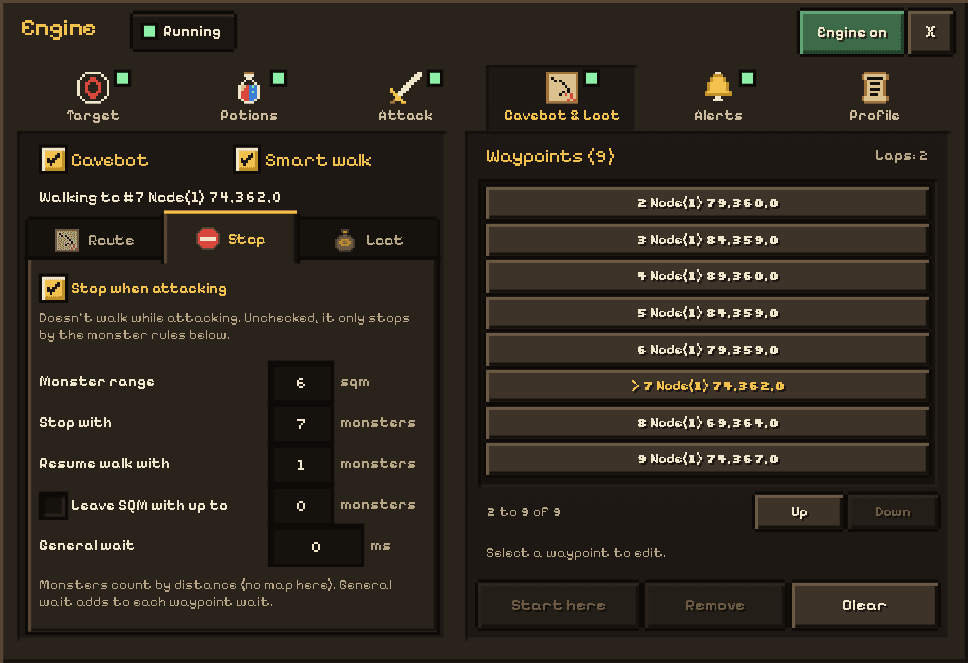
How to turn it on
- 1Open the Cavebot & Loot tab, on Stop.
- 2Choose what the Cavebot does while you attack: Stop when attacking, Chase the monster or Keep distance.
- 3Set Monster range, Stop with and Resume walk with.
Settings, one by one
While you attack
Pick one of the three modes: ticking one unticks the others. With none ticked, the Cavebot walks while fighting and only stops by the monster rules below.
Stop when attacking
Doesn't walk while attacking: the route waits until the fight is over. The screen shows “Paused: attacking”.
Values: On by default.
Chase the monster
Uses the game's own Follow while attacking: your character goes after the monster, and the route waits. The screen shows “Paused: chasing the monster”.
Values: Off by default.
Keep distance
Stays that many sqm away from the monster while attacking. It steps back when the monster comes close, without walking into a dead end or through a wall, and the route waits. The screen shows “Paused: keeping distance”. Good for Archer and Mage.
Values: 1 to 7 sqm. Default 3. Off by default.
Example3
When it stops
Monster range
How many sqm around you count for the rules below.
Values: 1 to 15 sqm. Default 6.
Example6
Stop with
Stops walking when this many monsters are in range.
Values: 0 to 15 monsters.
Example7
Resume walk with
After stopping, walks again when the count drops to this.
Values: 0 to 15 monsters. Default 1.
Example1
On each waypoint
Leave SQM with up to
With the checkbox ticked, only leaves the waypoint when there are at most this many monsters nearby. Good for clearing a spot before moving on.
Values: 0 to 15 monsters.
Example0
General wait
Extra time on every waypoint, added to each waypoint's own Wait.
Values: 0 to 99999 ms.
Example0
Example: mage who fights from afar
- Tick Keep distance and type 3 sqm.
- Monster range 6.
- Stop with 7, Resume walk with 1.
- Your character steps back when a monster comes close, and the route goes on when the fight is over.
On Knight, the game already takes your character to the monster, so Chase the monster and Keep distance make a difference on Archer and Mage.
Monsters count by distance, not by what is behind a wall: the bot doesn't read walls for this count.