
Attack (special)
Tab: Attack
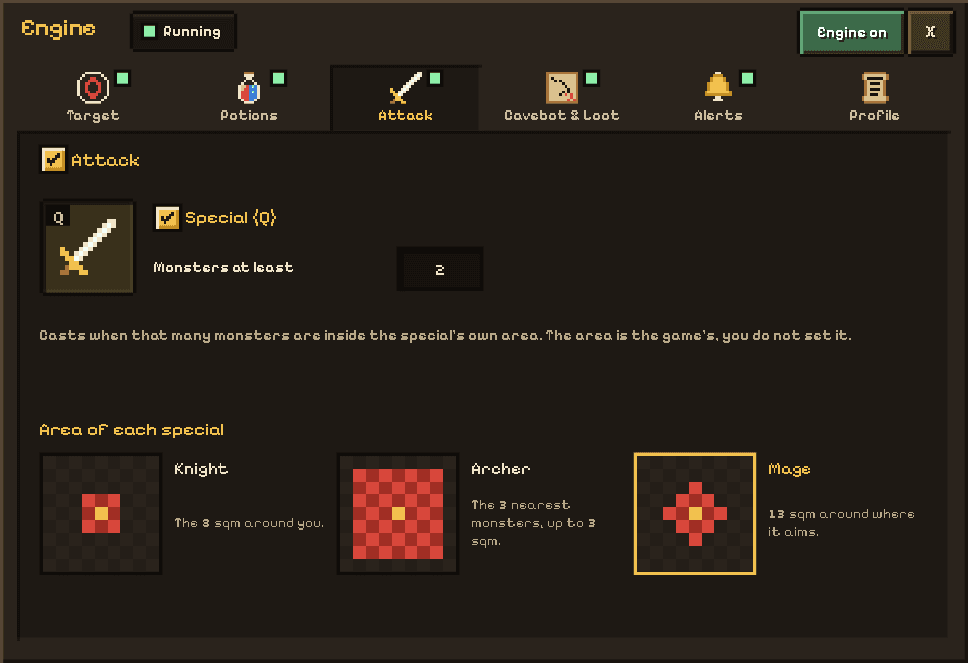
Attack casts your class's special (the Q key) when enough monsters are inside its area. The area is the game's own for each class, and on Mage the bot aims at the group by itself, only where your character sees. You only choose the minimum of monsters.
How to turn it on
- 1Open the Attack tab.
- 2Keep Special (Q) ticked and set Monsters at least.
- 3Tick the Attack checkbox and turn the Engine on.
Settings, one by one
Special (Q)
Monsters at least
The special only goes off when that many monsters are inside its area, so you don't spend mana on nothing.
Values: 1 to 15. Default 1.
Example2
Area of each special
The bot uses the game's area. You don't set it, and it changes by itself when you change class.
Knight
The 8 sqm around you.
Archer
The 3 nearest monsters, up to 3 sqm.
Mage
13 sqm around where it aims. The bot aims where it hits the most monsters, and only where your character sees, so it doesn't waste time on an aim blocked by a wall.
Example: knight in a group of monsters
- Tick Special (Q).
- Monsters at least: 2.
- Tick Attack and turn the Engine on.
The special doesn't need a target: it only looks at how many monsters are in the area. Your class is the weapon you have in hand, so switching weapons switches the area too.