
Potions
Tab: Potions
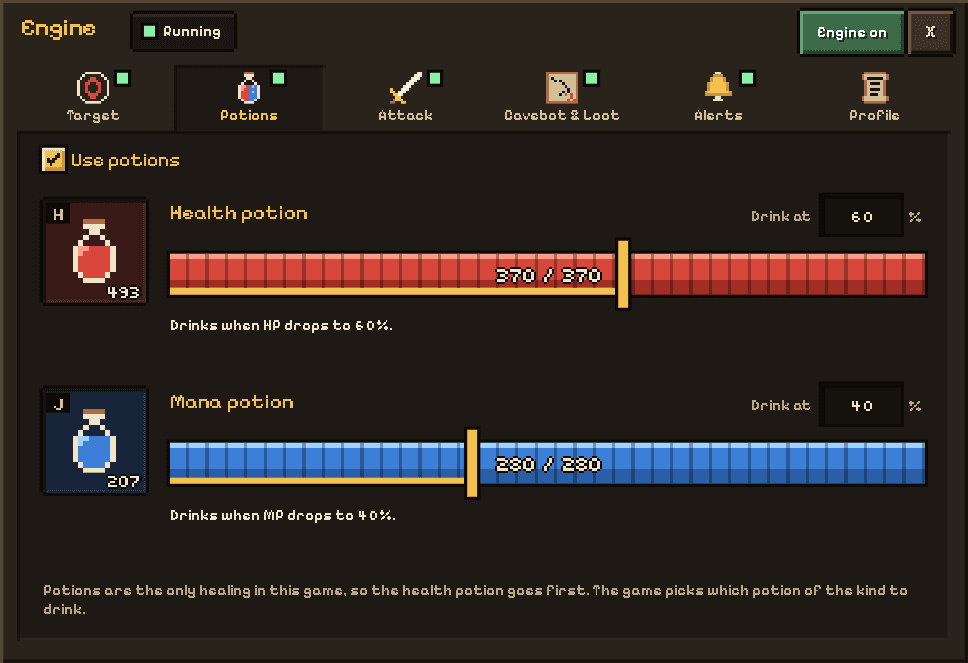
Potions are the only healing in the game, so this tab keeps you alive: the bot drinks a health potion and a mana potion at the percentage you choose, with the health potion first.
How to turn it on
- 1Open the Potions tab.
- 2Drag the marker on each bar, or type the percentage in Drink at.
- 3Tick Use potions and turn the Engine on.
Settings, one by one
The two potions
Health potion
Drinks when your HP drops to that percentage. It always comes before the mana potion.
Values: 0 to 100%. Default 50. At 0 it is off.
Example60
Mana potion
Drinks when your MP drops to that percentage.
Values: 0 to 100%. Default 50. At 0 it is off.
Example40
Example: mage
- Health potion at 60%.
- Mana potion at 40%.
- Tick Use potions and turn the Engine on.
The game picks which potion of the kind to drink. The numbers on the squares (H and J) are the potions you have left.