
Target
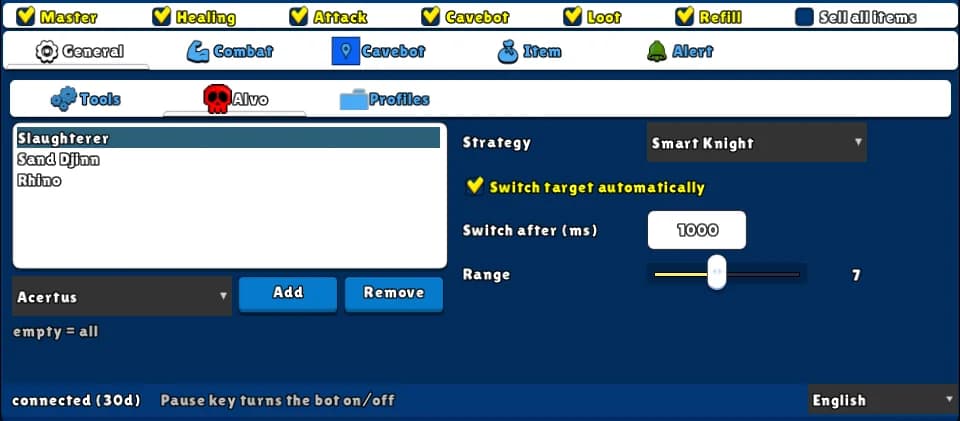
Switch: Attack · Tab: General → Alvo
Chooses which monster to attack next. You can list the monsters you hunt (or leave it empty to attack any), pick one of five ways to choose, and let it switch target by itself every few seconds. It never picks a monster behind a wall or an object.
How to turn it on
- 1Open the General tab and the Alvo sub-tab.
- 2Pick a monster in the list under the box and click Add. Repeat for each monster you hunt — or leave the box empty to attack any monster.
- 3Choose a Strategy and the Range.
- 4Tick Attack on the top row.
Settings, one by one
Which monsters
Monster list
The monsters the bot may attack. If the current target is not on the list, the bot drops it and picks one that is. Upper or lower case doesn't matter.
Values: Any monster of the game. Empty = all monsters.
ExampleSlaughterer, Sand Djinn, Rhino
Range
How far, in SQM around you, the bot looks for monsters.
Values: 1 to 15. Default 6.
Example7
How it chooses
Strategy
Distance: the nearest monster. Lowest life: the one with the least life left. Smart Healer and Smart Mage: the monster with the most others around it, so your ball spell hits the most. Smart Knight: the side (north, south, east or west) where your front-line attack hits the most monsters.
Values: Distance, Lowest life, Smart Healer, Smart Mage, Smart Knight. Default Distance.
ExampleSmart Knight for a knight, Smart Mage for a mage
Switch target automatically
Picks the target again every few seconds, even if the current one is still alive — useful with the Smart strategies, as the best monster changes while the pull moves.
Values: On or off. Off by default.
Switch after (ms)
How often it re-picks the target when the switch above is on, in milliseconds (1000 = 1 second).
Values: 0 to 60000. Default 2000.
Example1000
Example: knight in a crowded spawn
- Add Slaughterer to the list.
- Strategy Smart Knight, Range 7.
- Tick Switch target automatically, Switch after 1000.
- Tick Master and Attack.
Water and lava don't block the view, walls and objects do — the bot never wastes attacks on a monster it can't reach.
The Attack switch turns on both the targeting and the attacks of the Combat tab. Set up your attacks too, or the bot will only pick targets.