
Attack
Switch: Attack · Tab: Combat → Attack
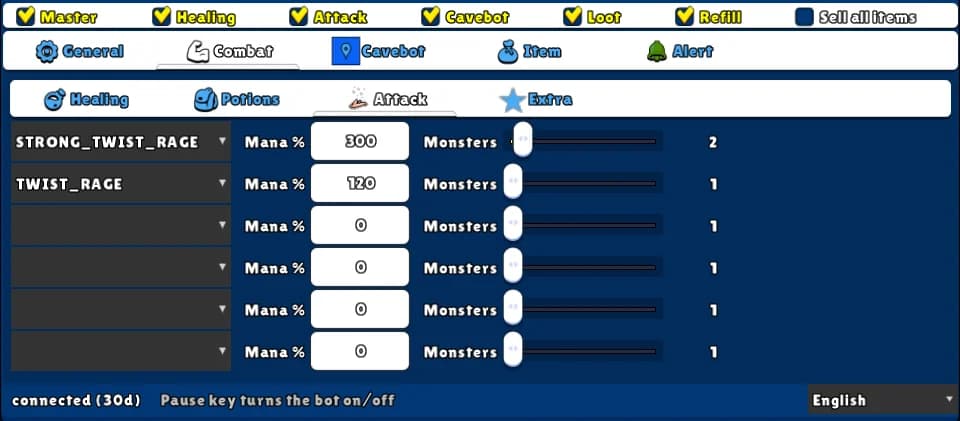
Casts your attack spells and runes on the target. Up to six slots, in priority order. Single-target attacks are cast whenever there is a target in sight; area attacks (ball, wave, surge, storm) only when at least the number of monsters you choose is inside the area.
How to turn it on
- 1Open the Combat tab and the Attack sub-tab.
- 2In each slot, pick a spell or rune — the strongest first. The mana field fills in by itself.
- 3For area spells, move Monsters to the minimum number of monsters it should hit.
- 4Put the spells and runes on the game's hotbar, set up the Target page, and tick Attack.
Settings, one by one
Spell or rune (6 slots)
The attack to cast. Runes come first in the list, then your vocation's spells. A blank slot is off. The top slot that is ready wins.
Values: Runes for every vocation (blast and ball), plus your vocation's spells.
ExampleSTRONG_TWIST_RAGE
Mana %
Despite the name, this is mana points, not a %. It fills in with the spell's cost when you pick it. The bot only casts when your mana is at least this much — raise it to keep mana for heals.
Values: 0 to 9999.
Example300
Monsters
For area spells: the minimum number of monsters inside the spell's area (counting only monsters you can see). Single-target spells ignore it.
Values: 1 to 15. Default 1.
Example2
Example: mage
- Slot 1: DETONATION, Monsters 6.
- Slot 2: THUNDERSTORM, Monsters 6.
- Slot 3: FIRE_SURGE, Monsters 2.
- Slot 4: FIRE_BALL, Monsters 1.
- Tick Master and Attack.
Put the big area spells first with a high Monsters value, and the single-target spell last — it fills the gaps.
Spells and runes must be on the game's hotbar.