
Follow and Smart Shooter
No switch (needs Master) · Tab: General → Tools
Follows a player (your leader) at the distance you choose. With Straight, it stays behind them, on the side they are facing away from. With Smart Shooter, a mage or healer behind the leader walks to the best spot and fires the big area spell where it hits the most monsters.
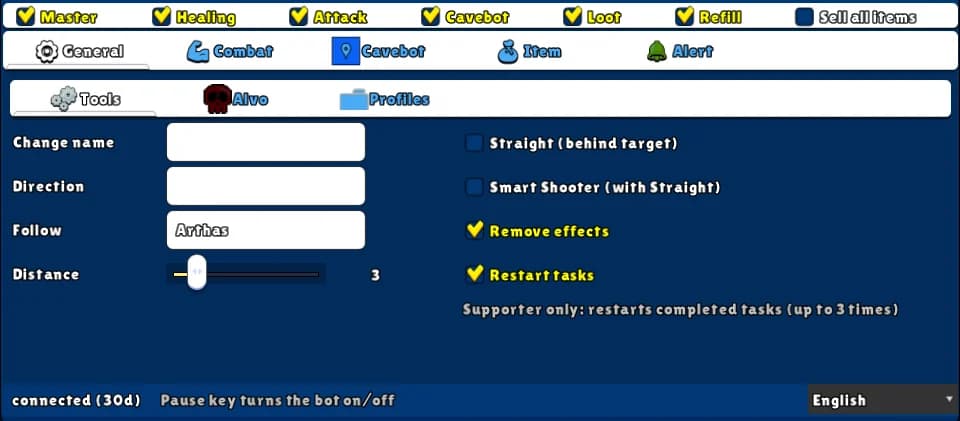
How to turn it on
- 1Open the General tab and the Tools sub-tab.
- 2Type the leader's name in Follow and choose the Distance.
- 3Optional: tick Straight (behind target), and Smart Shooter (with Straight).
- 4Keep Master on (and Attack, for Smart Shooter).
Settings, one by one
Follow
The name of the player to follow. Empty = don't follow.
ExampleArthas
Distance
How many SQM away to stay. The bot keeps exactly this distance, on a tile from where it can see the leader. 0 = on the leader's tile.
Values: 0 to 20. Default 4.
Example3
Straight (behind target)
Stays the Distance behind the leader, according to where they are facing.
Values: On or off.
Smart Shooter (with Straight)
With Follow, Straight and Attack on: casts the big area spell first (Thunderstorm, Detonation, Blizzard or Natural Intervention), walking to the best spot within the distance; then picks the wave or the ball, whichever hits more; then the rest of your attack list.
Values: On or off.
Example: mage behind a knight
- Follow: the knight's name, Distance 3.
- Tick Straight and Smart Shooter.
- Tick Master and Attack.
Follow works on the same floor only — it doesn't take stairs.
With the Cavebot on, Smart Shooter doesn't walk: it only aims from where you are.