
Loot
Switch: Loot · Tab: Item → Loot
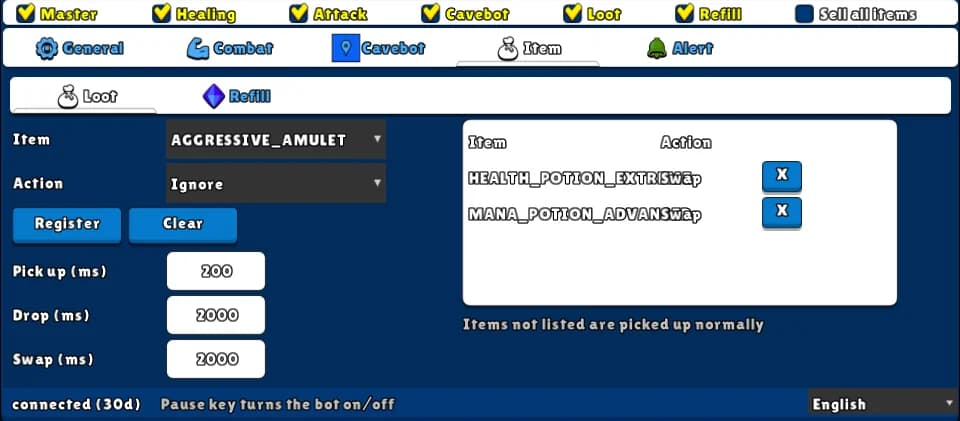
Picks up the loot from the monsters you kill using the game's loot key. Items not in the table are picked up normally; in the table you can mark items to Ignore (never pick up, and throw away) or to Swap (move from the loot bag to your main bag).
How to turn it on
- 1Set a loot key in the game.
- 2Open the Item tab and the Loot sub-tab.
- 3Only for items you want to treat differently: pick the Item, the Action and click Register.
- 4Tick Loot on the top row.
Settings, one by one
Rules
Item
The item the rule is about.
Values: Any item of the game.
ExampleHEALTH_POTION_EXTREME
Action
Ignore: never picked up, and thrown away if it lands in a bag. Swap: moved from the loot bag to the main bag (when there is room).
Values: Ignore or Swap.
ExampleSwap
Register / Clear
Register adds the rule (or replaces the rule for that item). Clear deletes all rules.
Speed
Pick up (ms)
Time between pick-ups.
Values: 50 to 600000. Default 200.
Drop (ms)
Time between throwing away Ignored items, one per time.
Values: 50 to 600000. Default 2000.
Swap (ms)
Time between moving Swap items.
Values: 50 to 600000. Default 2000.
Example: keep potions at hand
- Item HEALTH_POTION_EXTREME, Action Swap, Register.
- Tick Master and Loot.
Without a loot key set in the game, nothing is picked up.
The game picks up the whole tile, so an Ignored item lying with a wanted one comes along — the bot throws it away afterwards.