
Alarms
No switch (needs Master) · Tab: Alert
Four alarms watch out for you: Anti push, Player on screen, Low refill and Bag full. Each one can beep on your computer or phone, pause the bot or log out — tick the ones you want.
How to turn it on
- 1Open the Alert tab and pick the alarm's sub-tab.
- 2Tick what it should do: Sound, Pause and/or Logout. Click Test to hear it.
- 3Fill the alarm's own fields (ignore list, item and limit, bag sizes).
- 4Keep Master on — alarms only work while the bot is on.
Settings, one by one
What each alarm can do
Sound
Beeps on your computer or phone (not in the game). Each alarm has its own beep.
Pause
Turns Master off — the whole bot stops until you turn it on again.
Logout
Logs you out to the login screen, once per event.
Test
Plays the alarm's sound now.
The four alarms
Anti push
Your character was moved more than 3 SQM at once — pushed or teleported.
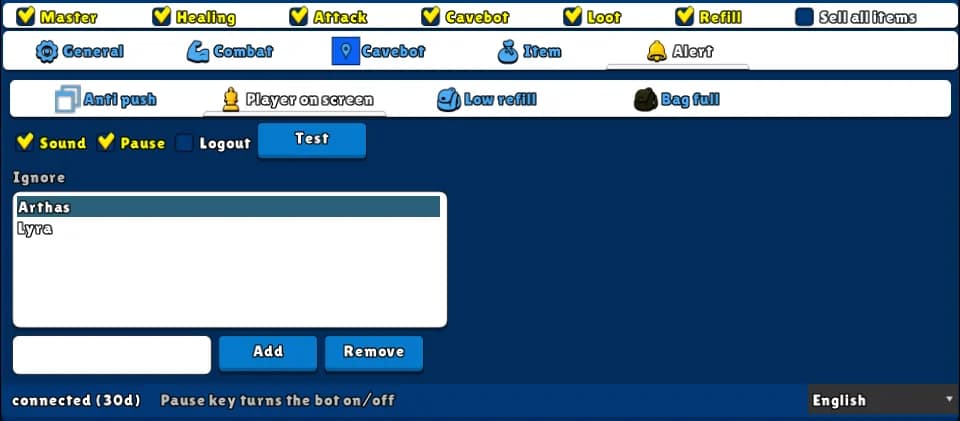
Player on screen
Another player appears on your floor, close to you, who is not on the Ignore list.
Values: Ignore: names of friends, upper or lower case doesn't matter.
ExampleIgnore Arthas, Lyra
Low refill
You have this many or fewer of the chosen item (potion or arrow) in the main bag.
Values: Item and Limit (0 = off). Default MANA_POTION_SMALL, 20.
ExampleMANA_POTION_ADVANCED, 100
Bag full
The main bag or the loot bag has this many stacks or more.
Values: Bag and Loot, 0 to 999 (0 = off). Default 18 and 18.
Example: hunting alone
- Player on screen: Sound and Pause, ignore your friends.
- Anti push: Sound and Logout.
- Low refill: MANA_POTION_ADVANCED, Limit 100, Sound.
After a Pause, the alarms are quiet too — they come back when you turn Master on.