
Cavebot: when to stop
Switch: Cavebot · Tab: Cavebot → General
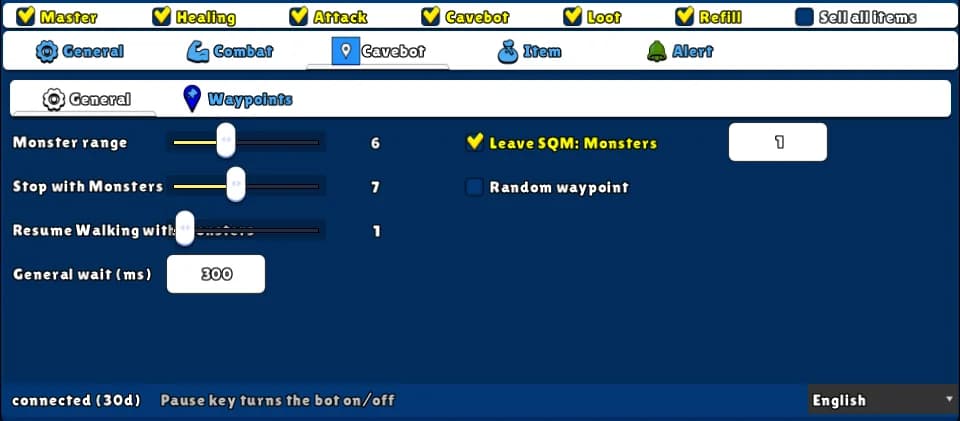
Decides when the bot stops walking to fight and when it walks on. It counts the monsters around you that it can actually reach (not behind walls or water), stops when there are many and walks again when only a few are left.
How to turn it on
- 1Open the Cavebot tab and the General sub-tab.
- 2Set Monster range, Stop with Monsters and Resume Walking with Monsters.
- 3Optional: a General wait, Leave SQM: Monsters and Random waypoint.
Settings, one by one
Stop and go
Monster range
How far (in SQM) the bot counts monsters. Only monsters it can reach on foot in a few steps count.
Values: 1 to 15. Default 6.
Example6
Stop with Monsters
Stops walking when this many monsters (or more) are counted.
Values: 1 to 15. Default 8.
Example3
Resume Walking with Monsters
After stopping, walks again when the count drops to this number or lower.
Values: 0 to 15. Default 1.
Example1
At each waypoint
General wait (ms)
Extra time added to the wait of every waypoint of the route.
Values: 0 to 99999. Default 0.
Example300
Leave SQM: Monsters
When ticked, the bot only leaves a waypoint when there are this many monsters or fewer around. 0 = only when it is clear.
Values: On or off, and 0 to 15.
ExampleOn, 1
Random waypoint
When it arrives, it jumps to one of the next 5 waypoints at random instead of the next one — harder to tell it is a bot.
Values: On or off. Off by default.
Example: careful knight
- Monster range 6.
- Stop with Monsters 3, Resume Walking with Monsters 1.
- Leave SQM: Monsters on, 1.
Leave SQM waits with no time limit: a monster you never kill (not on your target list) can hold the bot there.