
Healing
Switch: Healing · Tab: Combat → Healing
Casts your heal spell when your life drops to the % you choose. There are two slots — the top one comes first — and a separate spell that is cast whenever you are paralyzed.
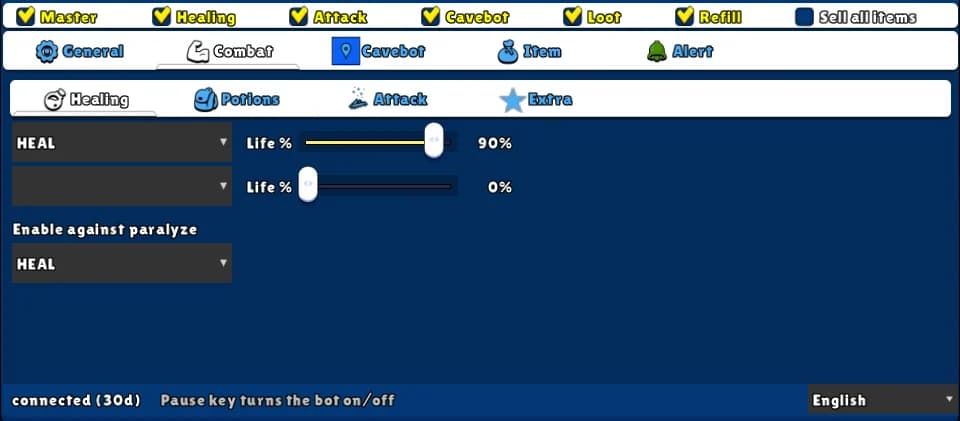
How to turn it on
- 1Open the Combat tab and the Healing sub-tab.
- 2In the first slot, pick your strongest heal and move Life % to when it should be used.
- 3Use the second slot for a lighter heal at a higher life %, if you want.
- 4Pick a spell in Enable against paralyze.
- 5Make sure the spells are on the game's hotbar, then tick Healing on the top row.
Settings, one by one
Heal slots
Heal (slot 1 and 2)
The heal spell or item to use. The list only shows what your vocation has. A blank slot is off. The top slot is checked first.
Values: LIFE_HEALING, MINOR_HEAL, HEAL, STRONG_HEAL, GREAT_HEAL, HEAL_STORM (by vocation).
ExampleHEAL
Life %
The heal is cast when your life is at this % or lower, and only if you have enough mana for it. At 0 it is never cast.
Values: 0 to 100. Default 0 (off).
Example90
Paralyze
Enable against paralyze
A heal spell that is cast every time you get paralyzed, to break it — no matter your life.
Values: One of your heal spells, or blank (off).
ExampleHEAL
Example: knight
- Slot 1: HEAL, Life % 90.
- Enable against paralyze: HEAL.
- Tick Master and Healing.
The bot presses the spell's button on the game's hotbar. If the spell is not on the hotbar, nothing happens.
The Healing switch also runs the Potions and the Extra sub-tabs.