
Profiles
Tab: General → Profiles
Saves your whole setup with a name — attacks, heals, potions, target, route, loot, refill, alarms and tools — and loads it again in one click. Three ready profiles come with the bot: HEALER_DEFAULT, KNIGHT_DEFAULT and MAGE_DEFAULT.
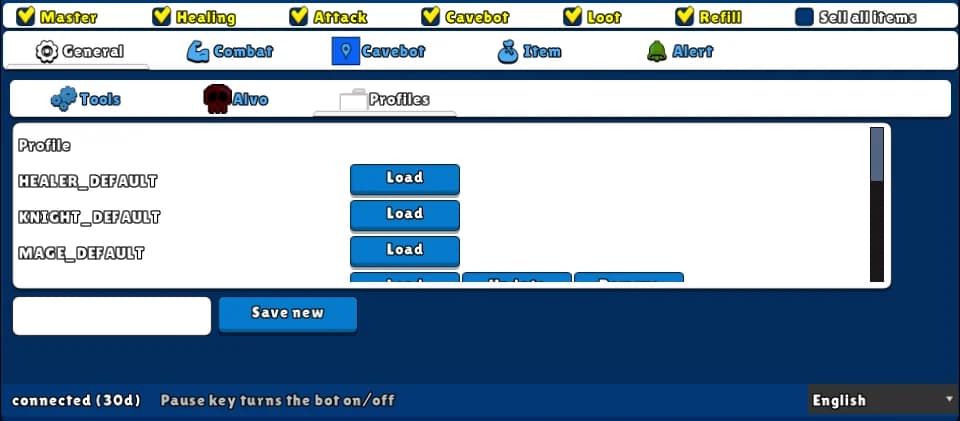
How to turn it on
- 1Open the General tab and the Profiles sub-tab.
- 2To start fast, click Load on the ready profile of your vocation.
- 3Adjust what you want, type a name next to Save new and click it.
- 4Next time, just click Load on your profile.
Settings, one by one
Load
Replaces all your current settings with the profile.
Update
Saves your current settings over that profile. Click twice: the first click asks Confirm?
Remove
Deletes the profile. Click twice: the first click asks Confirm?
Save new
Saves your current settings with the name you typed.
Exampleknight-slaughterer
Example: one profile per hunt
- Load KNIGHT_DEFAULT, record the route of your hunt, set loot and refill.
- Save new: knight-slaughterer.
- Change hunt by loading another profile.
The switches on the top row (including Master) and the Direction name are not saved — turn them on again after loading.
Loading a ready profile replaces everything, including your route (the ready ones have no route). Save yours first.