
Cavebot: the route
Switch: Cavebot · Tab: Cavebot → Waypoints
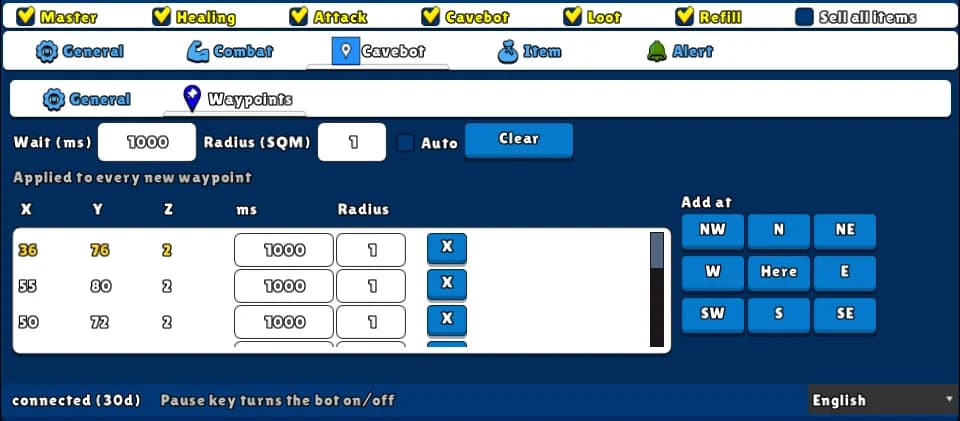
The route is a list of waypoints (spots on the map) that the bot walks in a loop. Record it by walking with Auto on, or add each waypoint with the Add at grid — on your tile or on the one next to you, in any direction. Each waypoint has its own wait and radius.
How to turn it on
- 1Open the Cavebot tab and the Waypoints sub-tab.
- 2Set Wait (ms) and Radius (SQM) for the new waypoints.
- 3Walk your route: click Here at each spot (or an arrow for the tile next to you), or tick Auto and walk it once.
- 4Untick Auto when the route is done, go back to the start and tick Cavebot on the top row.
Settings, one by one
New waypoints
These values go into every waypoint you add from now on.
Wait (ms)
How long the bot stays still at the waypoint before walking on, in milliseconds.
Values: 0 to 600000. Default 0.
Example1000
Radius (SQM)
How close counts as “arrived”. 0 = must step on the exact tile. 1 = the tile or any tile next to it, diagonals included. 2 or more = anywhere within that distance — good for open areas, so the bot doesn't fight for a single tile.
Values: 0 to 10. Default 1.
Example0 on stairs and doors, 1 or 2 in open fields
Auto
Records a waypoint on every new tile you step on. Walk the route once by hand and it is recorded. Needs Master on.
Values: On or off. Off by default.
Adding and editing
Add at
A 3×3 grid. Here adds a waypoint on your tile; each arrow (NW, N, NE, W, E, SW, S, SE) adds it on the tile next to you in that direction, on the same floor.
Values: One click = one waypoint.
ExampleStanding next to a door: click the arrow towards it
Waypoint table
X, Y and Z (floor) of each waypoint, with its own ms and Radius — click to change one waypoint only. X removes it. The waypoint the bot is walking to is shown in yellow.
Clear
Deletes the whole route at once (there is no confirmation).
Example: recording a hunt
- Wait 0, Radius 1, tick Auto.
- Walk the hunt once, back to where you started.
- Untick Auto. Change the Radius of the tiles in narrow corridors to 0.
- Tick Master and Cavebot. Save it all as a Profile.
The cavebot does not go up or down stairs or ropes: waypoints on another floor are skipped. Keep each route on one floor.
If the bot gets stuck it tries again, and after 4 seconds it skips to the next waypoint.