
Potions
Switch: Healing · Tab: Combat → Potions
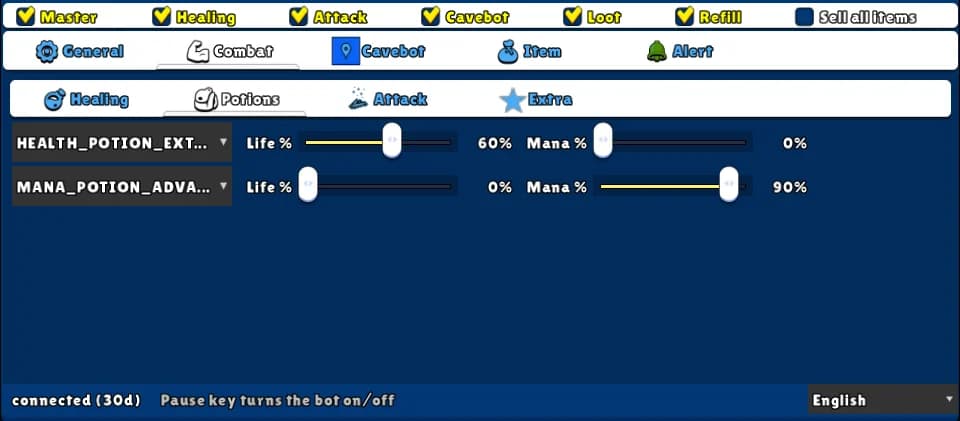
Drinks a potion when your life or your mana drops to the % you choose. Two slots, in priority order: if the top potion is needed but still on cooldown, the second one waits for it.
How to turn it on
- 1Open the Combat tab and the Potions sub-tab.
- 2Pick a potion in the first slot and set Life % and/or Mana %.
- 3Do the same in the second slot if you use two potions.
- 4Put the potions on the game's hotbar and tick Healing on the top row.
Settings, one by one
Potion (slot 1 and 2)
The potion to drink. The list only shows potions your vocation can use. A blank slot is off.
Values: Health, mana and blended potions, from SMALL to EXTREME.
ExampleHEALTH_POTION_EXTREME
Life %
Drinks when your life is at this % or lower. 0 = don't look at life.
Values: 0 to 100. Default 0.
Example60
Mana %
Drinks when your mana is at this % or lower. 0 = don't look at mana. If both are set, either one is enough.
Values: 0 to 100. Default 0.
Example90
Example: knight
- Slot 1: HEALTH_POTION_EXTREME, Life % 60.
- Slot 2: MANA_POTION_ADVANCED, Mana % 90.
- Tick Master and Healing.
Put the potion that saves your life in the top slot — it always has priority.