
Refill and Sell all
Switches: Refill, Sell all items · Tab: Item → Refill
Next to an NPC, the bot buys items back to the amount you want, sells items and deposits items — one rule per item. Sell all items, a switch on the top row, sells your whole loot bag to any NPC that buys it.
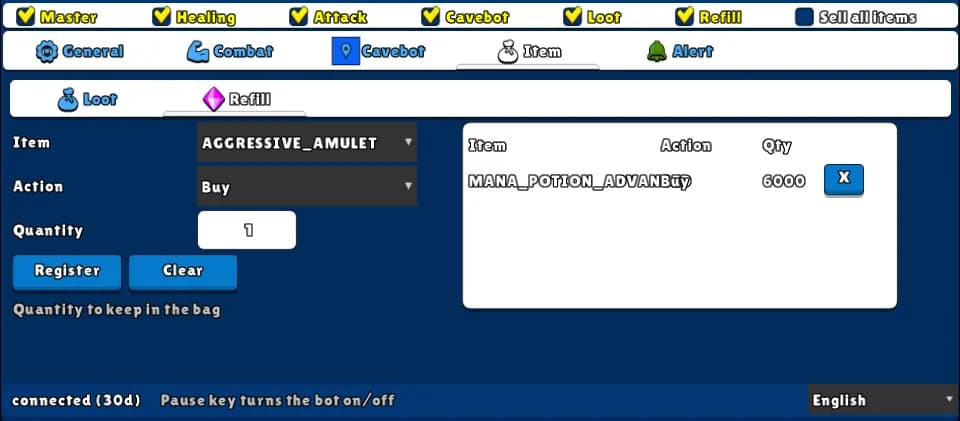
How to turn it on
- 1Open the Item tab and the Refill sub-tab.
- 2Pick the Item and the Action. For Buy, set the Quantity to keep. Click Register.
- 3Tick Refill (and/or Sell all items) on the top row.
- 4Walk next to the NPC — the bot does the rest.
Settings, one by one
Item
The item of the rule.
Values: Any item of the game.
ExampleMANA_POTION_ADVANCED
Action
Buy: buys until you have the Quantity in the main bag (up to 200 per purchase). Sell: sells all of that item from the loot bag. Deposit: deposits all of it from the main bag, at a depot NPC.
Values: Buy, Sell or Deposit.
ExampleBuy
Quantity
Only for Buy: how many to keep in the main bag — not how many to buy.
Values: 1 to 9999.
Example6000
Sell all items (top switch)
Sells the whole loot bag to any NPC nearby that buys at least one of the items in it. Works even with Refill off.
Values: On or off.
Example: refill at the potion shop
- Item MANA_POTION_ADVANCED, Action Buy, Quantity 6000, Register.
- Tick Master and Refill.
- Stand next to the potion NPC until the bot is done.
The bot does not walk to the NPC — it only works when you are within 3 SQM of one, on the same floor.
It doesn't check your gold before buying.